Posts Tagged ‘ Dynamics365

Microsoft Copilot: What, Where, How?

Over the past few years, one of the most frequently heard concepts in the technology world and business life has been “Copilot.” Copilot, which has become the cornerstone of Microsoft’s vision of placing AI not just as a tool but at the center of the work culture, now stands out as one of the most powerful symbols of digital transformation.

Defining Copilot merely as a chat assistant or a text-generating model would be incomplete. In fact, Copilot is a “digital assistant pilot” that works alongside users – an AI-powered business partner that makes sense of work, understands context, makes data-driven decisions, and automates routine processes. In short, Copilot does not replace humans; it augments them, increases their productivity, and helps them focus on more strategic tasks.

Microsoft’s Copilot approach is based on a strategy of embedding AI naturally into everyday tools. Now, when you are writing reports in Word, doing analysis in Excel, organizing a meeting in Teams, reviewing financial data in Dynamics 365, or generating summaries in Power BI, the same intelligence layer works together with you. This is what distinguishes Copilot from classic chatbots: it is not just a system that answers questions, but one that works with you.

Today, Copilot exists across a broad ecosystem from Microsoft 365 to Dynamics 365, from GitHub to Windows. Each application, each role, and each user is designed with the goal of “having a Copilot by your side.” GitHub Copilot that suggests code for developers, Dynamics 365 Copilot that summarizes reports for finance professionals, Microsoft 365 Copilot that prepares presentations for managers – all are part of the same vision: redefining productivity through the collaboration of humans and AI.
1. What Is Copilot?

Read more

How to Read and Analyze the Dynamics 365 F&O License Usage Summary Report – A Real-Life Scenario

How to Read and Analyze the Dynamics 365 F&O License Usage Summary Report – A Real-Life Scenario

License management has now become a necessity in Dynamics 365 ERP applications. With Microsoft’s license enforcement process, which will come into effect in November 2025, every menu item, role, and task accessed by each user in the system must be matched with the appropriate license type. Otherwise, companies may face unnecessarily high licensing costs.

So, what should system administrators or consultants do in this process? At this point, the newly introduced “Licenses Usage Summary (preview)” report by Microsoft becomes critically important. Now, license requirements can be analyzed in detail — not only based on the user’s assigned role in the system, but also by diving into which duties, privileges, and menu items (AOT) are accessible through that role. With this report, we can analyze which licenses a user needs and which roles are responsible for those needs.

In this article; We will examine the “Licenses Usage Summary (preview)” report, which is part of the new Security Governance framework, in detail through an example user. We will also review how to interpret license distribution based on specific Duties, Privileges, and User Roles.

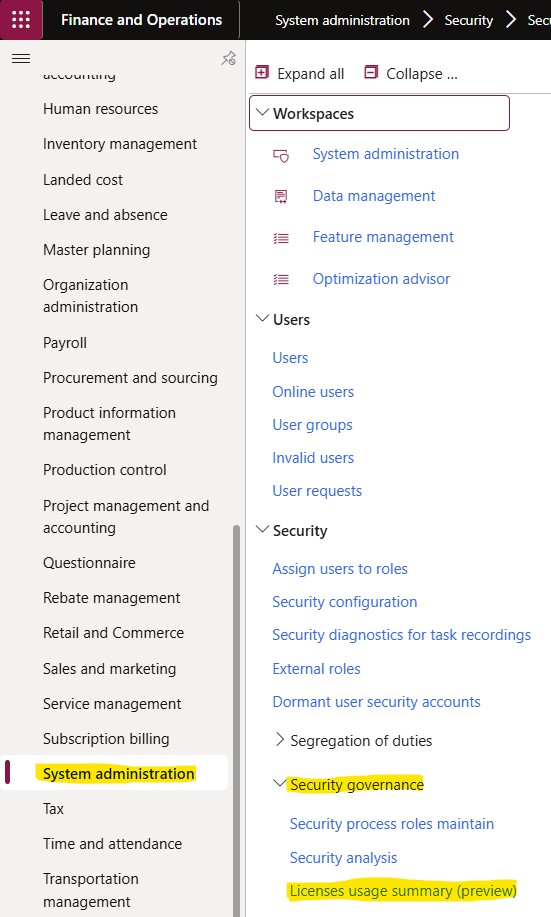
You can access the report from: System administration > Security > Security governance > Licenses usage summary (preview). You need to be on version 10.0.44. Additionally, if it is not already enabled, you must activate both “Security Governance” and the report separately through Feature management.

Resim 1

Read more

Microsoft 365 Copilot for Finance: Outlook add-in nasıl kurulur ve kullanılır?

Öncelikle Microsoft 365 Copilot for Finance’i biraz tanıyalım: Microsoft 365 Copilot for Finance, Microsoft’un yapay zeka destekli bir çözümüdür ve özellikle finans alanında çalışan profesyonellerin işlerini kolaylaştırmayı hedefler. Copilot, Microsoft 365 ve Dynamics 365 platformlarıyla entegre bir şekilde çalışarak finansal süreçleri hızlandırır, karmaşık verileri anlamlandırır ve daha iyi kararlar almanıza yardımcı olur.

Temel Özellikler:

  1. Yapay Zeka Destekli Öneriler:
    • Finansal raporlama, bütçeleme ve tahmin gibi süreçlerde yapay zeka öneriler sunar.
    • Örneğin, bütçe farklarını analiz eder ve sorunlu alanlara dikkat çeker.
  2. Doğal Dil İşleme (NLP):
    • Kullanıcılar, basit bir dilde yazılı veya sözlü talimatlarla finansal verilere erişebilir.
    • Örneğin: “Son üç ayın nakit akış raporunu göster” dediğinizde anında bir rapor oluşturabilir.
  3. Veri Analizi ve Görselleştirme:
    • Büyük finansal veri setlerini analiz eder ve kullanıcılara kolay anlaşılır görseller sunar.
    • Zaman alan manuel analizleri otomatize ederek iş gücünü azaltır.
  4. Entegrasyon:
    • Microsoft Teams, Excel, Power BI ve Dynamics 365 Finance gibi araçlarla uyumlu çalışır.
    • Bu sayede, farklı platformlar arasında veri aktarımı veya iletişim kesintileri minimuma indirilir.
  5. Risk ve Uyumluluk Yönetimi:
    • Finansal uyumluluk standartlarını sürekli kontrol ederek ihlaller konusunda uyarılar sağlar.
    • Örneğin, mali raporlamalarda hataları veya eksiklikleri hızlıca tespit eder.
  6. Proaktif Karar Alma:
    • Geçmiş verilerden öğrenerek geleceğe dair tahminlerde bulunur ve stratejik kararlar almanızda yardımcı olur.

Microsoft 365 Copilot for Finance: Outlook Add-in Kurulumu


Read more

Page 2 of 212