Posts Tagged ‘ Dynamics 365

Creating a New Model in a UDE Environment and First X++ Development

Dynamics 365 F&O UDE Series | Part 6

Creating a New Model in a UDE Environment and First X++ Development

Model, package, Operations Project, runnable class, build check, and the local/cloud development distinction in UDE

Introduction

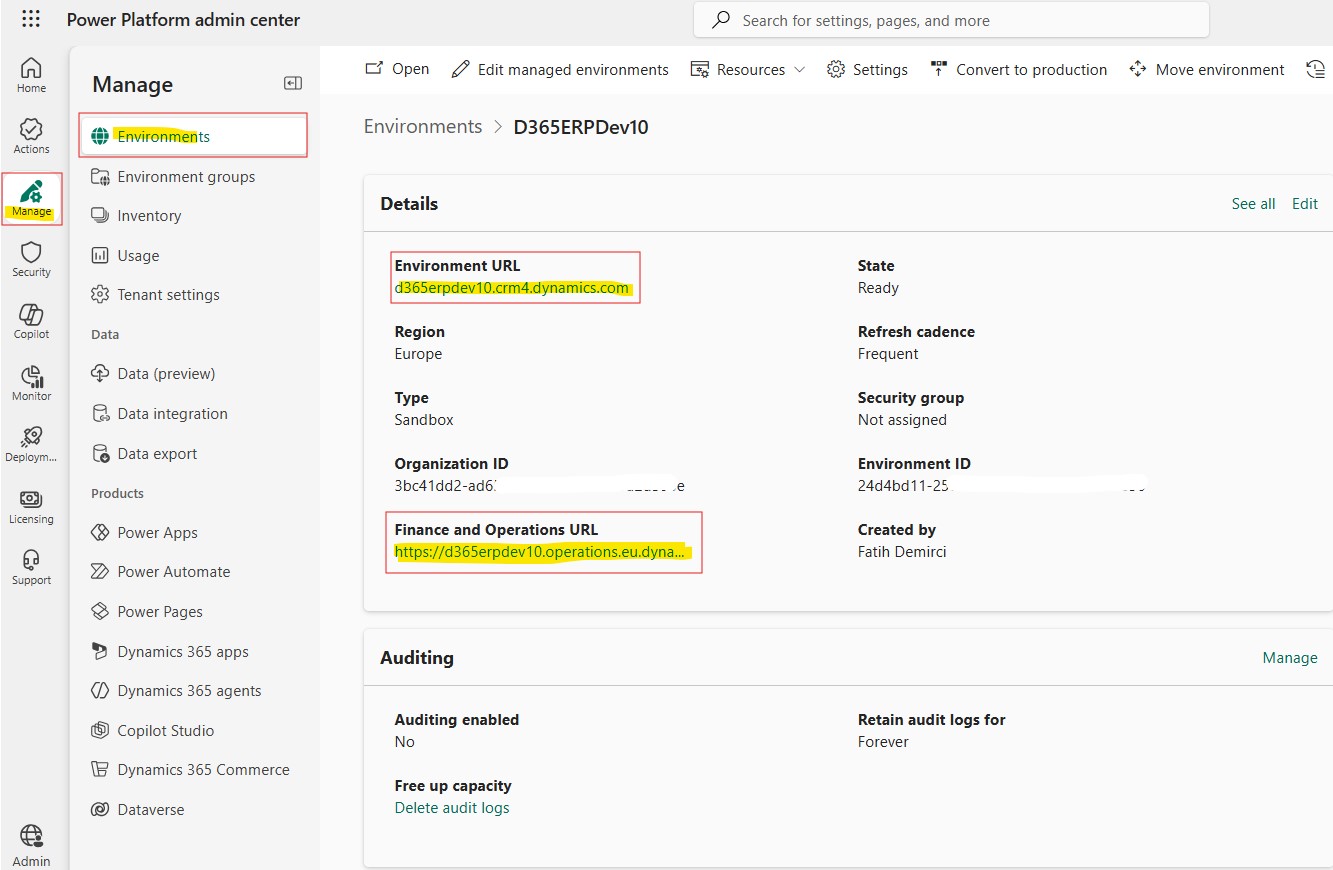
In the previous article of the series, we connected Visual Studio 2022 to the developer-enabled UDE environment we created on Power Platform. We covered the distinction between the Environment URL and the Finance and Operations URL, the Connect to Dataverse step, the Finance & Operations assets download process, the metadata configuration check, and how to verify that Application Explorer opens correctly.

In this article, we are now taking one step further. In a UDE environment where the connection has been completed, we will create a new model, position this model in the correct package structure, open an Operations Project in Visual Studio, and do our first simple X++ development.

For developers coming from the classic development VM model, there are both familiar and different points here. Model, package, project, Application Explorer, and build concepts are familiar. However, because the development tier and the execution tier are separated with UDE, some habits need to be reconsidered. Code and metadata are prepared on the local computer; execution, deploy, and test take place on the Finance & Operations runtime in the cloud.

Understanding this distinction correctly is one of the basic requirements for healthy development on UDE. Because creating and building an X++ object on the local computer does not mean that it will automatically run in the cloud runtime. To run and test it, the related model must be deployed to the online UDE environment. In this article, I will focus on the model, project, and first build side; I will cover the deploy and debug side with a short introduction and connect it to the next article.

Read more

UDE Ortamında Yeni Model Oluşturma ve İlk X++ Geliştirme

Dynamics 365 F&O UDE Serisi | Bölüm 6

UDE Ortamında Yeni Model Oluşturma ve İlk X++ Geliştirme

Model, package, Operations Project, runnable class, build kontrolü ve UDE’de local/cloud geliştirme ayrımı

Giriş

Serinin önceki yazısında Visual Studio 2022′yi Power Platform üzerinde oluşturduğumuz developer-enabled UDE ortamına bağlamıştık. Environment URL ve Finance and Operations URL ayrımını, Connect to Dataverse adımını, Finance & Operations assets indirme sürecini, metadata configuration kontrolünü ve Application Explorer’ın doğru açıldığını nasıl doğrulayacağımızı ele almıştık.

Bu yazıda artık bir adım daha ileri gidiyoruz. Bağlantısı tamamlanmış bir UDE ortamında yeni bir model oluşturacağız, bu modeli doğru package yapısı içinde konumlandıracağız, Visual Studio’da bir Operations Project açacağız ve ilk basit X++ geliştirmemizi yapacağız.

Klasik development VM modelinden gelen geliştiriciler için burada hem tanıdık hem de farklı noktalar var. Model, package, project, Application Explorer ve build kavramları tanıdık. Fakat UDE ile birlikte geliştirme tier’ı ve çalışma tier’ı ayrıldığı için bazı alışkanlıkları yeniden düşünmek gerekiyor. Kod ve metadata lokal bilgisayarda hazırlanıyor; çalışma, deploy ve test ise buluttaki Finance & Operations runtime üzerinde gerçekleşiyor.

Bu ayrımı doğru anlamak, UDE üzerinde sağlıklı geliştirme yapmanın temel şartlarından biri. Çünkü lokal bilgisayarda bir X++ nesnesini oluşturmak ve build etmek, onun otomatik olarak cloud runtime’da çalışacağı anlamına gelmiyor. Çalıştırma ve test için ilgili modelin online UDE ortamına deploy edilmesi gerekiyor. Bu yazıda önceliği model, proje ve ilk build tarafına vereceğim; deploy ve debug tarafını ise kısa bir girişle ele alıp sonraki yazıya bağlayacağım.

Read more

Connecting Visual Studio to a UDE Environment on Power Platform

Dynamics 365 F&O Unified Development Experience – Part 5

Connecting Visual Studio to a UDE Environment on Power Platform

Connect to Dataverse, Environment URL, Finance & Operations assets, and metadata configuration steps

In the previous article of this series, we covered how to prepare the developer machine for UDE by installing Visual Studio 2022 and the required tools.

In this article, we will connect Visual Studio to the developer-enabled UDE environment that we created on Power Platform. In my opinion, this is one of the first steps where the UDE experience really starts to become tangible.

In the classic development VM model, Visual Studio was already available inside the development machine. AOS, metadata, SQL Server, development tools, and most of the supporting components were located on the same machine. With UDE, this structure changes. Visual Studio runs on our local computer, while the Finance & Operations runtime runs in the cloud environment that we created on Power Platform.

For this reason, we need to correctly associate Visual Studio with the right online development environment, use the correct URL, complete the Finance & Operations assets and metadata download process, verify the metadata configuration settings, and make sure that Application Explorer opens properly.

In this article, I will go through this connection process step by step. I will especially focus on topics that can be confusing during the first attempts, such as the Environment URL / Finance and Operations URL distinction, the Connect to Dataverse screen, Auto setup behavior, and the relationship between metadata folders and the local repository structure.

A short preparation before connecting

Before connecting from Visual Studio, it is important to make sure that a few things are ready. If we move to the connection step before completing these checks, it becomes harder to understand whether a later error is caused by permissions, an incorrect URL, a missing extension, or the metadata download process.

It is useful to check the following items before starting:

  • The developer-enabled UDE environment should already be created.
  • The UDE environment should be in Ready state in Power Platform Admin Center.
  • Finance and Operations provisioning should be completed.
  • Platform Tools and Provisioning App installation should be completed.
  • The Developer Tools option should be enabled.
  • Visual Studio 2022 should be installed.
  • The Power Platform Tools for Visual Studio extension should be installed.
  • The user should have the required permissions in the related Dataverse / Power Platform environment.
  • There should be enough free disk space on the local machine for the initial setup and assets download.

For the first setup, it is usually easier not to start with an overly restricted user from a permissions perspective. Later, when moving to the real project structure, roles and security can be made more controlled.


Image-1

Read more

Visual Studio yu Power Platform Üzerindeki UDE Ortamına Bağlama

Dynamics 365 F&O Unified Development Experience – Bölüm 5

Visual Studio’yu Power Platform Üzerindeki UDE Ortamına Bağlama

Connect to Dataverse, Environment URL, Finance & Operations assets ve metadata configuration adımları

Serinin önceki yazısında UDE için geliştirici bilgisayarında Visual Studio 2022 ve gerekli araçların nasıl hazırlanacağını ele almıştık.

Bu yazıda artık Visual Studio’yu Power Platform üzerinde oluşturduğumuz developer-enabled UDE ortamına bağlayacağız. Bana göre bu adım, UDE deneyiminin gerçekten başladığı noktalardan biri.

Klasik development VM modelinde Visual Studio zaten development makinesinin içinde hazırdı. AOS, metadata, SQL Server, development tools ve çoğu yardımcı bileşen aynı makine üzerinde bulunuyordu. UDE modelinde ise bu yapı değişiyor. Visual Studio lokal bilgisayarımızda çalışıyor, Finance & Operations runtime ise Power Platform üzerinde oluşturduğumuz bulut ortamında bulunuyor.

Bu nedenle Visual Studio ile doğru online development ortamını eşleştirmek, doğru URL’yi kullanmak, Finance & Operations assets ve metadata indirme işlemlerini tamamlamak, metadata configuration ayarlarını kontrol etmek ve Application Explorer’ın sağlıklı açıldığını görmek gerekiyor.

Bu yazıda adım adım bu bağlantı sürecini ele alacağım. Özellikle ilk denemelerde kafa karıştıran Environment URL / Finance and Operations URL ayrımı, Connect to Dataverse ekranı, Auto setup davranışı ve metadata klasörlerinin repo yapısıyla ilişkisi üzerinde duracağım.

Bağlantıdan önce kısa hazırlık

Visual Studio’dan bağlantıya geçmeden önce bazı şeylerin hazır olduğundan emin olmak gerekir. Çünkü bu kontroller tamamlanmadan bağlantı adımına geçersek, sonradan alınan hatanın yetkiden mi, URL’den mi, eksik extension’dan mı, yoksa metadata indirme sürecinden mi kaynaklandığını anlamak zorlaşır.

Başlamadan önce aşağıdaki maddeleri kontrol etmek faydalı olur:

  • Developer-enabled UDE ortamı oluşturulmuş olmalı.
  • UDE ortamı Power Platform Admin Center üzerinde Ready durumda olmalı.
  • Finance and Operations provisioning tamamlanmış olmalı.
  • Platform Tools ve Provisioning App kurulumu tamamlanmış olmalı.
  • Developer Tools seçeneği aktif edilmiş olmalı.
  • Visual Studio 2022 kurulmuş olmalı.
  • Power Platform Tools for Visual Studio extension kurulmuş olmalı.
  • Kullanıcı ilgili Dataverse / Power Platform ortamında gerekli yetkilere sahip olmalı.
  • İlk kurulum ve assets indirme için lokal diskte yeterli boş alan bulunmalı.

İlk kurulumlarda mümkünse yetki tarafında fazla daraltılmış bir kullanıcıyla başlamamak işleri kolaylaştırır. Daha sonra gerçek proje düzenine geçerken roller ve güvenlik yapısı daha kontrollü hale getirilebilir.


Resim-1

Read more

Installing Visual Studio 2022 and Preparing the Development Tools

Dynamics 365 F&O Unified Development Experience – Part 4

Installing Visual Studio 2022 and Preparing the Development Tools

Preparing the required tools on the developer machine before connecting to the UDE environment

In the previous articles in this series, we first looked at what UDE is, and then covered how to create a developer-enabled UDE environment through the Power Platform Admin Center interface and with PowerShell.

At this point, we have a UDE environment with Finance & Operations developer tools enabled. However, to develop X++ by using this environment, some tools must be ready on the developer machine.

In the classic development VM model, Visual Studio, metadata, AOS connection, and many other components came preconfigured inside the development machine. In the UDE model, development tools run on the developer’s local computer, while the Finance & Operations runtime is hosted in the cloud.

Therefore, in this article, before connecting directly to the UDE environment, we will focus on how to prepare Visual Studio 2022 and the required components on the developer machine.

In the next article, we will connect Visual Studio to the UDE environment on top of this setup and cover the steps for downloading metadata and Finance & Operations assets.

Why is this step important?

With UDE, the role of the development machine is changing. Instead of a development VM that we connect to through Remote Desktop and where everything is already installed, we now develop through Visual Studio running on our own computer.

In this model, the following items must be installed correctly on the local computer:

  • Visual Studio 2022
  • Required Visual Studio workloads and individual components
  • Power Platform Tools for Visual Studio
  • Required infrastructure for Finance & Operations development tools
  • Microsoft SQL Server Express LocalDB
  • SQL Server Management Studio, if needed
  • Reporting Services Projects extension
  • Sufficient disk space

If these components are missing or installed incorrectly, you may experience issues in Visual Studio with the UDE connection, metadata download, opening Application Explorer, creating models, or running builds.

Read more

Visual Studio 2022 Kurulumu ve Geliştirme Araçlarının Hazırlanması

Dynamics 365 F&O Unified Development Experience – Bölüm 4

Visual Studio 2022 Kurulumu ve Geliştirme Araçlarının Hazırlanması

UDE ortamına bağlanmadan önce geliştirici bilgisayarında gerekli araçların hazırlanması

Serinin önceki yazılarında önce UDE’nin ne olduğunu, ardından Power Platform Admin Center arayüzüyle ve PowerShell ile developer-enabled UDE ortamı oluşturmayı ele almıştık.

Artık elimizde Finance & Operations developer tools özellikleri aktif edilmiş bir UDE ortamı var. Ancak bu ortamı kullanarak X++ geliştirme yapabilmek için geliştirici bilgisayarında bazı araçların hazır olması gerekiyor.

Klasik development VM modelinde Visual Studio, metadata, AOS bağlantısı ve birçok bileşen development makinesinin içinde hazır geliyordu. UDE modelinde ise geliştirme araçları geliştiricinin lokal bilgisayarında çalışıyor, Finance & Operations runtime tarafı ise bulutta konumlanıyor.

Bu yüzden bu yazıda doğrudan UDE ortamına bağlanmadan önce, geliştirici bilgisayarında Visual Studio 2022 ve gerekli bileşenleri nasıl hazırlamamız gerektiğine odaklanacağız.

Bir sonraki yazıda ise bu kurulumun üzerine Visual Studio’yu UDE ortamına bağlayacak, metadata ve Finance & Operations assets indirme adımlarını ele alacağız.

Neden bu adım önemli?

UDE ile birlikte geliştirme makinesinin rolü değişiyor. Artık uzak masaüstü ile bağlandığımız, her şeyin içinde hazır olduğu bir development VM yerine, kendi bilgisayarımızda çalışan Visual Studio üzerinden geliştirme yapıyoruz.

Bu modelde lokal bilgisayarda şunlar doğru kurulmuş olmalı:

  • Visual Studio 2022
  • Gerekli Visual Studio workloads ve individual components
  • Power Platform Tools for Visual Studio
  • Finance & Operations development tools için gerekli altyapı
  • Microsoft SQL Server Express LocalDB
  • Gerekirse SQL Server Management Studio
  • Reporting Services Projects extension
  • Yeterli disk alanı

Bu bileşenler eksik veya hatalı kurulursa Visual Studio tarafında UDE bağlantısı, metadata indirme, Application Explorer açılması, model oluşturma veya build işlemlerinde sorun yaşanabilir.

Read more

Creating a UDE Environment with PowerShell

Dynamics 365 F&O Unified Development Experience – Part 3

Creating a UDE Environment with PowerShell

Creating a developer-enabled Dynamics 365 Finance & Operations environment with PowerShell

In the previous article of the series, we covered how to create a developer-enabled UDE environment by using the Power Platform Admin Center interface.

Proceeding through the interface is especially useful in the first trials. Seeing which option is on which screen, how Dynamics 365 apps are enabled, where Platform Tools and Provisioning App are installed from, and where the Developer Tools option appears makes the process easier to understand.

However, in real life, especially for partners, ISVs, or teams managing multiple environments, doing these operations from the interface every time is not a very sustainable method. The environment creation process needs to be standard, repeatable, and documentable.

In this article, we will look at how we can do the same work with PowerShell.

Why PowerShell?

The most important advantage of creating a UDE environment with PowerShell is that it standardizes the process.

When creating an environment from the interface, many selections are made manually. Settings such as template selection, region, demo data, developer tools, language, and currency are determined by the user each time. Naturally, this increases the possibility of errors.

On the PowerShell side, we include these decisions in the script. This way, the same script can be reused for different tenants, projects, or trial environments with small changes.

Read more

A New Era in Dynamics 365 FO: From LCS to Power Platform Admin Center and UDE

Dynamics 365 F&O UDE Article Series – Part 1

A New Era in Dynamics 365 F&O: From LCS to Power Platform Admin Center and UDE

Part 1: The new management approach, UDE, and first impressions

For many years, Lifecycle Services had a central role in the Dynamics 365 Finance & Operations world. Creating new projects, managing environments, provisioning cloud-hosted environments, deployments, database operations, and many other operational processes were handled through LCS. For anyone working on Finance & Operations projects, LCS was almost the natural starting point.

However, the direction Microsoft has been taking recently is now quite clear. Finance & Operations environment management is gradually moving toward Power Platform Admin Center. In new projects, PPAC is taking a more central role instead of LCS. Finance & Operations environments are now starting to be managed under the same administration experience together with Dataverse, Power Apps, Power Automate, Copilot Studio, and other Dynamics 365 applications.

I do not think this change should be interpreted simply as “we will now create the environment from another screen.” Microsoft is aiming to manage the Business Applications product family through a more integrated platform. From this perspective, it is quite meaningful that Finance, Supply Chain Management, Commerce, Project Operations, Dataverse, and Power Platform components are moving closer to the same management experience.

Of course, this transition is not fully complete yet. On the Power Platform Admin Center side, not every function we are used to in LCS has a one-to-one equivalent. Some features will be moved to PPAC over time, some will change with a different approach, and some will probably not continue in their old form. On the other hand, PPAC also brings new possibilities in terms of capacity management, environment visibility, Power Platform integration, Dataverse connection, and centralized administration.

Read more

Dynamics 365 F&O’da Yeni Dönem: LCS’den Power Platform Admin Center’a Geçiş ve UDE

Dynamics 365 F&O UDE Yazı Serisi – Bölüm 1

Dynamics 365 F&O’da Yeni Dönem: LCS’den Power Platform Admin Center’a Geçiş ve UDE

Bölüm 1: Yeni yönetim yaklaşımı, UDE ve ilk değerlendirmeler

Dynamics 365 Finance & Operations tarafında uzun yıllar boyunca Lifecycle Services merkezi bir konumdaydı. Yeni proje oluşturma, ortam yönetimi, cloud-hosted environment kurulumu, deployment, database işlemleri ve birçok operasyonel süreç LCS üzerinden yürütülüyordu. Finance & Operations projelerinde çalışan herkes için LCS neredeyse doğal başlangıç noktasıydı.

Ancak Microsoft’un son dönemde izlediği yön artık çok net. Finance & Operations ortam yönetimi yavaş yavaş Power Platform Admin Center tarafına taşınıyor. Yeni projelerde LCS yerine PPAC daha merkezi bir rol üstleniyor. Artık Finance & Operations ortamları, Dataverse, Power Apps, Power Automate, Copilot Studio ve diğer Dynamics 365 uygulamalarıyla birlikte aynı yönetim çatısı altında ele alınmaya başlıyor.

Read more

Transforming X++ into a General Web-Based Application Development Platform.

Microsoft Dynamics 365 F&SCM/FO/AX/Axapta was originally developed in collaboration between IBM and the Danish company Damgaard Data, with the first version released as IBM Axapta in March 1998. Axapta included its own development system, a combination of MorphX and the X++ programming language. MorphX and X++ had went through a significant evolution after Microsoft acquired the product in 2002. Initially, it was only designed to support enterprise resource planning processes, but today, with the support of Microsoft’s vision and technologies, X++ has become a powerful web development platform, but is still only available within Dynamics 365 F&SCM.

Along with its rapid development capabilities, strong database integration, high performance, object-oriented programming and the ability to efficiently manage business rules, X++ is able to provide fast and excellent solutions to the complexity of the business world. Currently, thousands of additional solutions developed with X++ are successfully used in ERP. However, the dependency of these solutions on Dynamics 365 F&SCM infrastructure limits their potential customer base.

In this article, we will discover the benefits of X++ becoming a mainstream web development platform and the opportunities this transformation can create for business, Microsoft and the X++ ecosystem. With detailed analysis and examples, we will evaluate how this transformation can be realized, the implications and challenges it may bring. Finally, we will try to create a platform for the entire ecosystem to discuss this transformation.

Why should this transformation be essential, and what benefits will it bring when completed?

  • There are currently thousands of modules and functions are written by X++. While these are currently dependent on Dynamics 365 F&SCM, many of them can be productized and sold independently. Developing these products with a different language that lacks of an  infrastructure similar to X++ is both costly and challenging. Leveraging these existing products through AppSource or independent sales could create numerous opportunities for Dynamics 365.
  • X++ allows for the rapid and easy development of many corporate web products, providing opportunities for both the X++ and Dynamics 365 ecosystems. Additionally, product and solution diversity will will support to growing Dynamics 365′s competitive position. Producing products with X++ is faster and more reliable than other languages.
  • This transformation will expand X++ ecosystem. The interaction of different resources working with X++ will allow for solutions to emerge in unexpected areas. Moreover, the growth of this ecosystem will positively impact the growth of Dynamics 365 F&SCM, enhancing its visibility.
  • Making X++ a new and easily accessible language for training resources will increase its appeal, especially for individuals at the beginning of their careers. Additionally, there will be no need for virtual machines or lengthy installations for training, making X++ development easily experiencable for many.
  • Open-source logic can be applied to X++ projects, resulting in the development of more powerful products. Furthermore, aligning with Microsoft‘s vision, this transformation will accelerate the development of X++.
  • The existing X++ ecosystem simplifies the widespread adoption and training of this new structure. Numerous X++ trainers and creators are already exists and more can be quickly added.
  • Along with these new products and ecosystem, cross-sell and co-sell opportunities will be increased.
  • The current structure of the X++ development environment is already suitable for this transformation. I believe that this transformation can be accomplished with a relatively uncomplicated project. With the contribution of volunteers from the X++ ecosystem, an initial version for training purposes could be released. In this version, the ability to create new objects would be sufficient.
  • Given that products developed with X++ can be easily integrated into the Microsoft ecosystem and provides cost advantages, they will be preferable.
  • X++ can be a language and platform for education, particularly for foundational software training in schools, especially in Object-Oriented Programming and Database Management courses. To support this, educational content can be prepared.
  • X++ language and development framework are enable the easy, fast, and reliable development of products. Particularly, the simplicity in database transactions, the structure of EDT and Enum, the security architecture, and the organized nature of Events provide for well-organized code and the creation of straightforward solutions for complex needs. Applications hosting large volumes of data can be developed easily.
  • It’s noteworthy that within the current X++ environment, developers already possess the capability to write code in C# and make use of .NET libraries seamlessly. This inherent flexibility allows for a powerful synergy between the robust features of X++ and the extensive functionalities offered by C# and the broader .NET ecosystem. Leveraging this advantage, the transformation of X++ into a comprehensive web-based development platform gains an extra layer of versatility. Developers, familiar with C# syntax and accustomed to working with .NET libraries, can seamlessly transition their skills to enhance X++ applications. This not only streamlines the development process but also extends the potential areas of application, making X++ an even more adaptable and developer-friendly platform.
  • While Microsoft currently offers Power Pages for citizen developers as a web development tool, there is no such tool for core developers. X++ can quickly fill this gap. This transformation will not only avoid competition with Microsoft‘s other products,it will also increase the usage of Power Platform and Dynamics 365. On the Azure side, it is anticipated to have an even greater impact.
  • Especially in corporate web solutions where data processing is crucial and complex code is required, X++ can be quickly and easily put into operation, making it a highly preferred tool.

How can X++ be transformed into a general web development platform?

  • The most important step towards X++‘s goal of becoming a general software development language starts with having a structure that can be easily developed locally like C#. At this point, the current state is very close to this goal, but the size of the system complicates this transformation. A language that gets rid of this complexity can realize this evolution much more smoothly.
  • X++ should be come with a framework that simplifies development, not just the language itself. When I refer to X++, I mean the development structure that comes with the framework. This structure is the main goal we want to achieve. Thus, while there will be an Application Object Tree (AOT), almost no standard objects will be present initially. When developing a new application, we should be able to include different modules in our project if we wish.

Structures that can be optionally added include:

  1. User management
  2. Standard EDTs and Enums
  3. Security infrastructure
  4. Workflow management
  5. Address management
  6. Company structure
  7. Data Management Framework (DMF)
  8. SQL Server Reporting Services (SSRS)
  9. Office integration
  10. Batch jobs
  11. Web service structure
  12. Power platform integration
  13. Power BI
  14. Model package management
  • Servers for a product developed with X++ can be made ready on Azure. These offers make advantage of Azure consumption.. However, this should not be a requirement and alternative options should be available.
  • It should be compatible with different versions of SQL Server. It can be done in the future to enhance its ability to work with various databases, expanding integration opportunities with different databases.
  • The initial version can start in a simpler form, leaving out structures that could complicate matters initially, such as Map, Extension, Table Extension, etc.
  • The standard Dynamics 365 F&SCM structure can remain the same. This should be released as a new product.

In Conclusion:

Throughout this article, we have examined many advantages of transforming X++ into a general web development platform. X++ is known as a language that stands out with its robust database management, rapid development capabilities, object-oriented programming features, and effective business rule management. However, using these powerful features in the context of general web development will open up access to a wider user base and offer potential solutions in various projects.

The evolution of X++ into a general web development platform not only creates new opportunities but also allows for the modernization of existing projects. Developers can produce more efficient, faster, and powerful projects with this transformation. This feature will gives companies a competitive advantage and allowing the language to create a richer ecosystem with a broader developer base.

However, achieving these goals requires not only technical challenges but also community support, educational resources and developer collaboration. Get through these challenges and leveraging the potential of X++ can provide benefits to developers and to the business world.

In conclusion, the transformation of X++ into a general web development platform allows for a wider perspective on the language. This transformation will carry out the foundations of the language into general web applications, providing more effective and competitive solutions in future projects.The X++ community, the developer team, and Microsoft can contribute together to ensure the success of this journey. I can’t wait to see what the future holds!

Happy Daxing!

Fatih Demirci

2024
Page 1 of 212