Archive for the ‘ UDE ’ Category

Creating a UDE Environment Through the Power Platform Admin Center Interface

Dynamics 365 F&O Unified Development Experience – Part 2

Creating a UDE Environment Through the Power Platform Admin Center Interface

Creating a developer-enabled Dynamics 365 Finance & Operations environment step by step

In the first article of this series, I tried to explain what UDE is, how it differs from the classic development VM approach, and why it is important.

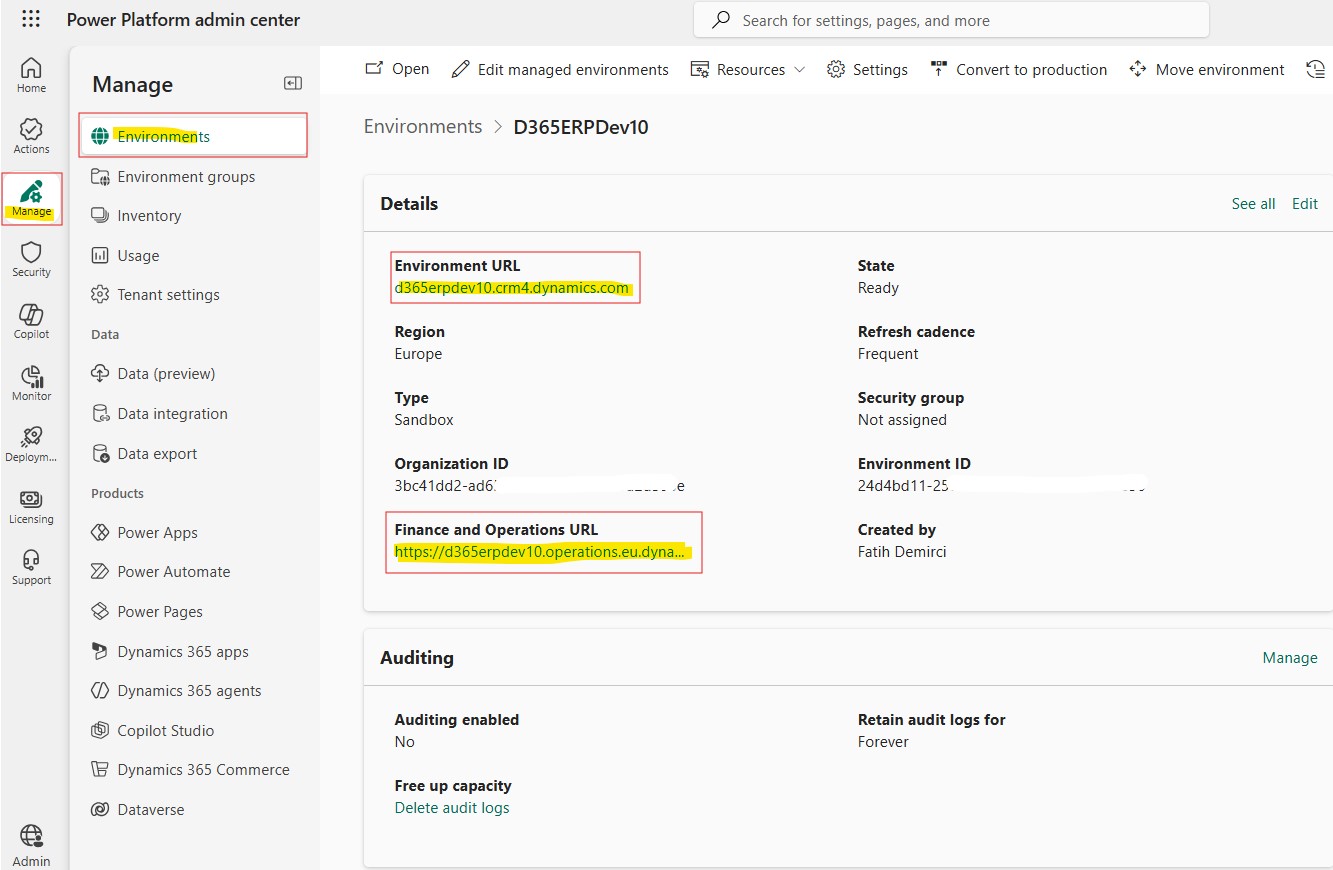
In this article, we are moving a little more into the practical side. Our goal is to create a developer-enabled UDE environment for Dynamics 365 Finance & Operations by using the Power Platform Admin Center interface.

I will cover environment creation with PowerShell in a separate article. In my opinion, creating the first environment through the interface is more useful for seeing the screens and understanding the logic of the process. After that, making the same process repeatable with a script becomes much more meaningful.

Before you start

There are a few basic prerequisites that should be ready before creating a UDE environment.

First of all, the user who will create the environment must have the required admin permissions. Usually, one of the following roles is sufficient:

  • Power Platform Administrator
  • Dynamics 365 Administrator
  • Global Administrator

The tenant must also have the appropriate licenses and capacity to create Finance & Operations applications. Especially Dataverse database capacity and Operations database capacity should be checked.

Important note: The “Developer Environment” type on the Power Platform side is not used for UDE. UDE is a Sandbox environment with Finance & Operations developer tools enabled. If this distinction is confused, unexpected errors may appear in the later steps of the setup.

Read more

Power Platform Admin Center Arayüzü Üzerinden UDE Ortamı Oluşturma

Dynamics 365 F&O Unified Development Experience – Bölüm 2

Power Platform Admin Center Arayüzü Üzerinden UDE Ortamı Oluşturma

Developer-enabled Dynamics 365 Finance & Operations ortamını adım adım oluşturma

Serinin ilk yazısında UDE’nin ne olduğunu, klasik development VM yaklaşımından nerede ayrıldığını ve neden önemli olduğunu anlatmaya çalışmıştım.

Bu yazıda artık biraz daha uygulama tarafına geçiyoruz. Amacımız Power Platform Admin Center arayüzünü kullanarak Dynamics 365 Finance & Operations için developer-enabled bir UDE ortamı oluşturmak.

PowerShell ile ortam oluşturma konusunu ayrı bir yazıda ele alacağım. Çünkü ilk ortamı arayüzden oluşturmak, ekranları görmek ve sürecin mantığını anlamak açısından bana göre daha faydalı. Sonrasında aynı işlemi script ile tekrar edilebilir hale getirmek çok daha anlamlı oluyor.

Başlamadan önce

UDE ortamı oluşturabilmek için birkaç temel ön koşulun hazır olması gerekiyor.

Öncelikle ortamı oluşturacak kullanıcının gerekli admin yetkilerine sahip olması gerekir. Genellikle aşağıdaki rollerden biri yeterli olur:

  • Power Platform Administrator
  • Dynamics 365 Administrator
  • Global Administrator

Ayrıca tenant üzerinde Finance & Operations uygulamalarını oluşturabilecek uygun lisans ve kapasitenin bulunması gerekir. Özellikle Dataverse database capacity ve Operations database capacity tarafı kontrol edilmelidir.

Önemli not: UDE için Power Platform tarafındaki “Developer Environment” tipi kullanılmaz. UDE, Finance & Operations developer tools özellikleri aktif edilmiş bir Sandbox ortamdır. Bu ayrımı karıştırınca kurulumun ilerleyen adımlarında beklenmeyen hatalar alınabiliyor.

Read more

A New Era in Dynamics 365 FO: From LCS to Power Platform Admin Center and UDE

Dynamics 365 F&O UDE Article Series – Part 1

A New Era in Dynamics 365 F&O: From LCS to Power Platform Admin Center and UDE

Part 1: The new management approach, UDE, and first impressions

For many years, Lifecycle Services had a central role in the Dynamics 365 Finance & Operations world. Creating new projects, managing environments, provisioning cloud-hosted environments, deployments, database operations, and many other operational processes were handled through LCS. For anyone working on Finance & Operations projects, LCS was almost the natural starting point.

However, the direction Microsoft has been taking recently is now quite clear. Finance & Operations environment management is gradually moving toward Power Platform Admin Center. In new projects, PPAC is taking a more central role instead of LCS. Finance & Operations environments are now starting to be managed under the same administration experience together with Dataverse, Power Apps, Power Automate, Copilot Studio, and other Dynamics 365 applications.

I do not think this change should be interpreted simply as “we will now create the environment from another screen.” Microsoft is aiming to manage the Business Applications product family through a more integrated platform. From this perspective, it is quite meaningful that Finance, Supply Chain Management, Commerce, Project Operations, Dataverse, and Power Platform components are moving closer to the same management experience.

Of course, this transition is not fully complete yet. On the Power Platform Admin Center side, not every function we are used to in LCS has a one-to-one equivalent. Some features will be moved to PPAC over time, some will change with a different approach, and some will probably not continue in their old form. On the other hand, PPAC also brings new possibilities in terms of capacity management, environment visibility, Power Platform integration, Dataverse connection, and centralized administration.

Read more

Dynamics 365 F&O’da Yeni Dönem: LCS’den Power Platform Admin Center’a Geçiş ve UDE

Dynamics 365 F&O UDE Yazı Serisi – Bölüm 1

Dynamics 365 F&O’da Yeni Dönem: LCS’den Power Platform Admin Center’a Geçiş ve UDE

Bölüm 1: Yeni yönetim yaklaşımı, UDE ve ilk değerlendirmeler

Dynamics 365 Finance & Operations tarafında uzun yıllar boyunca Lifecycle Services merkezi bir konumdaydı. Yeni proje oluşturma, ortam yönetimi, cloud-hosted environment kurulumu, deployment, database işlemleri ve birçok operasyonel süreç LCS üzerinden yürütülüyordu. Finance & Operations projelerinde çalışan herkes için LCS neredeyse doğal başlangıç noktasıydı.

Ancak Microsoft’un son dönemde izlediği yön artık çok net. Finance & Operations ortam yönetimi yavaş yavaş Power Platform Admin Center tarafına taşınıyor. Yeni projelerde LCS yerine PPAC daha merkezi bir rol üstleniyor. Artık Finance & Operations ortamları, Dataverse, Power Apps, Power Automate, Copilot Studio ve diğer Dynamics 365 uygulamalarıyla birlikte aynı yönetim çatısı altında ele alınmaya başlıyor.

Read more