From XPO to XML: AI-Assisted X++ Code Upgrade from AX 2009 to Dynamics 365 ERP
When a move from AX 2009 to Dynamics 365 Finance & Operations comes up, one of the topics we focus on most is how to migrate the customizations developed over the years. In a system that has been in use for a long time, tables, classes, forms, and reports become part of the way the company operates. Identifying which customizations are still needed, understanding the existing business logic, and adapting it to the new version form an important part of the transition.
There are significant differences between the two versions from a development perspective. Finding the Dynamics 365 equivalent of an AX 2009 form, report, or modification to a standard object is not always straightforward. While we can migrate some structures in a similar way, others need to be reconsidered using the methods available on the new platform. Compiling the code alone is not enough, either. We need to check that forms, reports, and business rules work as expected.
So where can we use AI in this process? How can we establish a workflow for understanding X++ code, identifying dependencies between objects, and generating code suitable for the target version? This is one of the topics I have been working on recently. I believe we can use AI more systematically in the code upgrade process, particularly when we define transformation rules in advance and regularly validate the generated results.
In this article, we will use XPO files exported from AX 2009 as our starting point. We will examine the source objects with Claude Code, establish transformation rules, and migrate them to the metadata XML structure used by Dynamics 365. Throughout the process, we will discuss which changes are mandatory, where decisions are needed, and how we can check the generated objects. Using a car rental module, we will examine tables, forms, and the conversion of MorphX reports to SSRS step by step.
One point I particularly care about here is being able to trace the reasons behind the changes. We should be able to see how a field, method, or relationship is represented in the target version. When we find an error in the source code, we should also be able to distinguish it from the changes required for the version upgrade. The rule set and decision records we create will help us both control the transformation and reuse the knowledge in subsequent development work.
The scope of this article is the migration of application code and metadata structures. Migrating transaction data, balances, and historical transactions requires a separate effort. Here, we will focus on the process from code analysis through compilation in the target environment, using the forms, and generating report output.
Before we begin
Before moving on to code migration, we need to prepare the source files and the target development environment. It is just as important for AI to know which structure to use when creating objects and how to validate them as it is for it to read the source code. We will therefore begin by bringing together XPO files, labels, working examples from the target environment, and compilation tools.
Let us also briefly explain the key concepts we will use throughout the article:
Table 1. Key concepts
| Concept | Description |
| XPO | A file format that lets us export AX 2009 AOT objects as text, including their code and properties. These files will form the source of the transformation. We will preserve the original files and keep the generated objects in a separate folder. |
| UDE | Unified developer environment. The cloud development environment used together with local development tools under the Unified Development Experience approach; we will use it to deploy generated objects and perform runtime checks. |
| xppc | The compiler that allows us to compile X++ code from the command line. We will use this tool for compilation checks to identify errors earlier during the transformation. |
| Package and model | The structures we use to organize development in Dynamics 365. A model defines objects and model information, while a package is associated with the build and deployment structure. We will create the migrated objects in the appropriate metadata folders of the target model. |
| Overlayering | Making changes directly to a standard object. When migrating customizations made this way in earlier versions to Dynamics 365, we will need to evaluate options such as extensions, Chain of Command, and event handlers. |
| Form pattern | Design patterns that define the structure of forms and the layout of controls. Examples include Simple List, Details Master, and Details Transaction. We will create the target form by selecting the appropriate pattern based on how the source form is used. |
We will have four resources ready at the outset: AX 2009 XPO and label files, a ready-to-use UDE environment, a reference model that compiles in the same environment, and Claude Code together with a compilation check script. We will cover source file preparation in detail in the next section.
On the target side, a ready-to-use unified developer environment (UDE) is required. Under the Unified Development Experience approach, this environment enables local development tools to work together with the Finance and Operations environment in the cloud. The development package version used in this work is 10.0.2527.116. We need to validate the metadata structure, form patterns, and standard object dependencies against our own target environment.
Another preparation step is to select a Dynamics 365 model that compiles and runs in the same environment as a reference. Rather than simply describing the target XML structure to Claude Code, we will also show it objects that work correctly. We will use these examples when generating tables, forms, or classes. For object types not available in the reference model, we will examine standard objects in the target version.
Finally, we will prepare Claude Code and the script we will use for compilation checks. While Claude Code handles examining the sources and generating target objects, we will run xppc checks through the script. This will allow us to see errors at each stage and return to the relevant object or transformation rule without waiting for the entire transformation to finish.
<strong><!–more–></strong>
Preparing XPO and label files
First, we need to export the customizations we want to migrate from AX 2009. We will use XPO files for this. An XPO contains more than X++ code; it also includes table fields, object properties, form controls, and report sections. This allows Claude Code to see which object the code belongs to and the structure in which it operates while examining methods.
We can decide how to export based on the scope of the customizations. If we want to migrate a specific module, collecting the relevant objects under a project and exporting it as an XPO gives us a starting point that is easier to follow. For a broader effort, we can also export by layer. However, as the scope grows, grouping objects by module and dependency will make analysis and validation easier.
One point we need to pay attention to is which other objects the objects in the project depend on. When we export a form, we also need to have the custom tables, EDTs, enums, or classes it uses. Comparing the objects in the project tree with the XPO contents and identifying dependencies outside the project will prevent missing sources during the transformation.
We should include the label files (.ald) for the languages in use alongside the sources. For example, the @KBR5 identifier in the XPO does not itself contain the text displayed to the user; the label source for the relevant language is also needed. Preparing labels together with the source prevents field captions and messages from being omitted during migration.
In older customizations, we may also find text written directly into code or object properties. Form titles, field descriptions, or user messages may have been defined this way. We will identify these texts during analysis and plan how to move them into labels in the target model. We will also address the preparation of translations into languages such as Turkish and English within the same scope.
After collecting the files, it is useful to record which environment, project or layer they came from, and when they were exported. If development continues in the source system, we may need newer versions of the same objects later. Without knowing which source files we are working with, it becomes difficult to tell whether a difference in the target comes from new development or a change made during transformation.
For this reason, we will preserve the original XPO and label files and keep generated objects in a separate folder. We will track the source files, the rule set we use, the target version, and the transformation plan together. This will allow us to return to the same source when needed, rerun the transformation, and compare the results.
Which changes will we make when migrating the code
Our priority during code migration will be to preserve the behavior of the existing application. We will migrate fields, methods, and business rules in a way that allows comparison with the source system. While making the adaptations required by Dynamics 365, we will evaluate changes intended to improve the existing customization separately.
The one-to-one migration approach here should not be understood as copying every object using the same technical structure. For example, the structure we use will change when converting a MorphX report to SSRS. What we are trying to preserve is which data the report retrieves, which calculations it performs, and which information it presents to the user.
We will consider the changes made during transformation in three groups:
Table 2. Changes permitted during transformation
| Type of change | How we will apply it |
| Naming changes | We will adapt object names to the naming rules defined for the target model. For example, ZBDCarTable will become DmrCarTable. We will also apply this change to the code and metadata references where the object is used. |
| Changes required by the target platform | We will adapt structures used in the source that do not work the same way in the target environment. This includes migrating MorphX reports to SSRS, evaluating WinApi calls tied to the old client, and recreating the security structure. |
| Changes agreed within the project | We will decide preferences such as form pattern selection, preparation of Turkish and English labels, and the privilege and duty structure in advance and include them in the transformation plan. |
This distinction becomes particularly important when we encounter a problem in the source code. The old application may contain a missing validation, an incorrect calculation, or a query that affects performance. AI can identify these during analysis and suggest fixes. However, applying every suggestion during migration makes it difficult to trace the reasons for the resulting differences. Changes required for compatibility with the target platform become mixed with customizations that alter existing behavior.
For this reason, we will not directly apply improvements that do not prevent the application from running in the target environment. We will record them in the issue list as Improvement and explain their impact and the proposed solution. We will address them separately after reviewing them with the relevant business unit or customer. This will allow us to check first that the existing behavior has been migrated, and then test subsequent improvements within their own scope.
We will keep transformation rules under docs/rules and object-specific decisions in the decision log. We will establish the folder structure and the contents of these documents in the following sections.
Our workflow will follow the same approach: first, we will inventory the sources and then prepare an object-by-object transformation plan. Once the plan has been reviewed and approved, we will generate target objects and run compilation checks. When fixing errors, we will examine whether the problem comes only from the relevant object or from the transformation rule. If a rule is incomplete, we will update it as well.
Even when working with the same source and rule versions, we will not assume that AI will produce exactly the same files every time. We will compare outputs through version control and validation steps.
The car rental module we will use in this work
I will explain the process using a small car rental module developed in AX 2009. Since the module brings together different object types, including tables, forms, classes, and reports, it provides a useful example for examining the situations we may encounter during transformation.
The source project contains 43 objects in total: 5 tables, 2 views, 5 EDTs, 4 enums, 1 class, 7 forms, 3 MorphX reports, 1 query, 5 jobs, 1 menu, and 9 menu items. All of these are custom objects; there are no modified standard objects. This count refers to the business objects in the export; the PRN project node used for scope validation is counted separately.
The texts in the module were written in Turkish directly in the code and object properties. During migration, we will identify these texts as well and move them into the target model’s label structure.
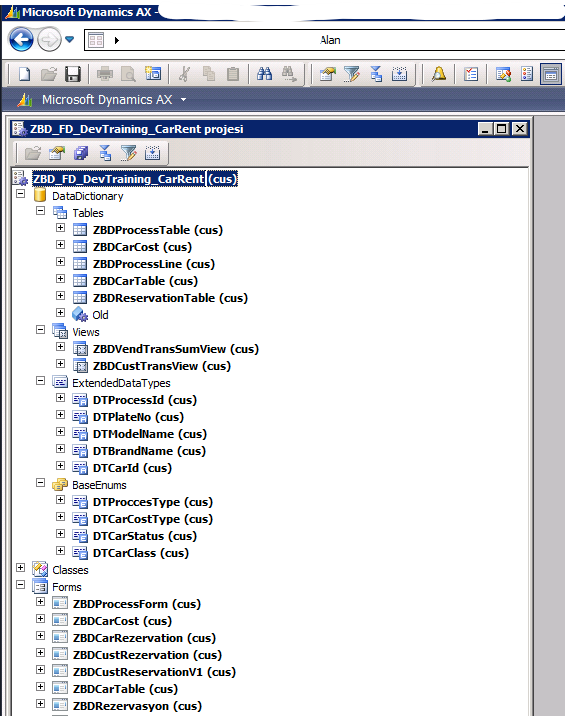
Figure 1. The AX 2009 project tree of the car rental module.
We do not need to migrate every object in the source to the target. First, we will evaluate what each object does, whether it is still needed, and how it will be handled in the target environment. This work resulted in the following outcomes for the objects in the module:
Table 3. Transformation results for source objects
| Result | Number of source objects | Description |
| Migrated | 36 | 67 target metadata elements were generated; in addition, 68 label identifiers with en-us and tr-TR translations were prepared. |
| Excluded from scope | 5 | Jobs created for testing, training, and one-time data corrections were not migrated. |
| Awaiting a decision | 2 | The file browsing class and its associated menu item were kept outside the generation scope until a decision was made on the method to use in the target. |
The source object counts in Table 3 match the inventory: 36 + 5 + 2 = 43. The 67 elements in the target represent outputs generated from the 36 migrated source objects; the 68 labels are counted separately. For example, migrating a MorphX report requires multiple SSRS components. Label and object counts should not be confused with the reference validation counts we will see later.
When examining jobs, we also need to look at why they were used. One of the jobs in this project had been created to experiment with array operations and produced an error when run. Another changed all vehicles in the company to the “Service” status without applying any filter. It would not be appropriate to migrate such code simply because it exists in the source project. We will also record objects that are not migrated and the reasons in the transformation plan.
The package containing the migrated objects completed the full compilation check with xppc in the UDE environment with zero errors. The forms also opened after deployment to the development environment. In the following sections, we will examine how we reached this result, the errors we encountered, and the checks performed in the application.
Establishing the project structure and transformation rules
After preparing the sources, we will establish the folder structure we will work in. Keeping source files, analysis documents, and generated objects in separate locations makes the process easier to follow. Particularly when we need to regenerate an object, we must be sure that the original file has been preserved and know which rules we are using.
We will use the following folder layout for this work:
source/AX2009/xpo/ Original XPO files
source/AX2009/labels/ Original .ald label files
docs/rules/ Transformation rules
docs/decisions.md Decisions and their rationale
analysis/<Proje>/ Inventory, transformation plan, and issue list
target/D365/Metadata/ Generated D365 package and model files
CLAUDE.md Project instructions for Claude Code
We will not modify the files kept under source during transformation. Analysis and generation will use these files, while target objects will be created under target. This will allow us to compare source and target and restart the transformation from the same sources when needed.
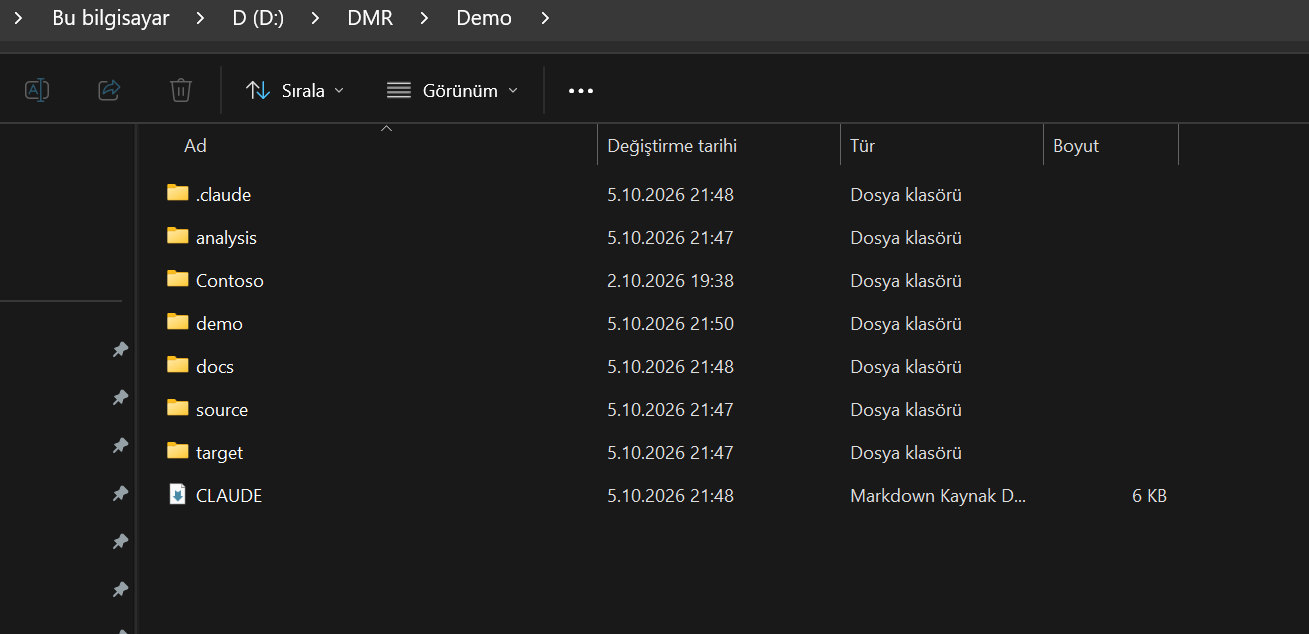
Figure 2. The folder structure separating source files, analysis documents, rules, and target objects.
Project instructions for Claude Code
In CLAUDE.md, we will define how we want Claude Code to work in this project. We will explain the purpose of the folders, the order in which transformation will proceed, and which operations require plan approval.
For example, this file will specify that source files must not be modified, an inventory must be prepared first, cases not covered by existing rules must be recorded, and target objects must not be generated before the plan is approved. Keeping these instructions in the project reduces the need to explain the same decisions again in subsequent work.
We can also support source file protection through tool permissions. In Claude Code’s current permission structure, the Edit path rule is used for built-in tools that modify files. We can add the following example, anchored to the project root, to .claude/settings.json:
{
“permissions”: {
“deny”: ["Edit(/source/**)"]
}
}
The Edit rule covers built-in file editing tools; there is no need to add a separate Write(path) rule. This setting does not provide filesystem-level read-only protection for all subprocesses. We should also support source protection with version control and, where necessary, filesystem permissions. We will check permission behavior in the Claude Code version we use.
How we will define transformation rules
Rather than collecting rules in a single long file, we will separate them by topic. We will use separate rule files for naming, tables and data types, forms, classes, reports, security, and extension structures. This will make it easier to examine the relevant form rules when working on a form and the report transformation decisions when migrating a report.
Each rule will have an identifier. We will also explain which source structure it applies to, what result it should produce in the target, and why the decision was made. The following are some examples of the rules used in this work:
Table 4. Examples of transformation rules
| Rule ID | Source structure | Action in the target | Basis |
| NAM-001 | Object whose name begins with ZBD or DT | The prefix is changed to Dmr, while the rest of the name is preserved. | Naming decision |
| DAT-021 | Relationship defined on an EDT | The source EDT relationship is examined; the appropriate field mapping and table relationship are created on the relevant table. | Project decision; validated per object |
| DAT-026 | Index with no AllowDuplicates value specified | <AllowDuplicates>Yes</AllowDuplicates> is explicitly written in the target to preserve source behavior. | Transformation requirement |
These rules contain the decisions made for the project and the transformation approaches validated in the target environment. When using them in another project, we need to reassess their suitability for the source structure and target version.
We will link each object in the transformation plan to the relevant rule IDs. This will allow us to trace why an object was generated in a particular way. If we encounter a case not covered by the existing rules, we will not ask Claude Code to continue by guessing. We will first add the case and the proposed solution to the issue list and, after evaluation, create a new rule or an object-specific decision.
Preparing Claude Code for the work
After preparing the project instructions, we can give Claude Code its first analysis task. At this stage, we will keep the sources, relevant rule files, target location, and validation commands accessible together.
The working reference model will demonstrate the target structure to use during generation. During inventory and planning, our priority will be to identify source objects and missing dependencies.
Our first task will be to examine the sources before generating code. We can use an initial instruction such as the following:
Examine the source XPO and label files. Identify the list of objects, their dependencies, missing references, and any modifications to standard objects. Prepare an upgrade plan containing the transformation rules to apply to each object and the issues that require decisions. Do not modify source files or generate target metadata before the plan is approved.
With this instruction, we will first see what we are going to migrate and which issues need clarification. For example, if there is a reference to a class missing from the source, or if it is unclear how an old function will be handled in the target, we can evaluate these before moving on to code generation.
We will use the same compilation, label, and metadata validation scripts throughout analysis and generation. We will cover how these checks work in the “Compiling and validating generated objects” section.
Creating an inventory of the objects in the XPO
To prepare the transformation plan, we first need to clarify the contents of the XPO we have. Which objects are present, where do they use one another, and is anything missing from the source package? We will collect the answers in the inventory document.
Listing object names alone will not be enough. We will also identify whether each object is custom or a modified standard object, along with its data types, relationships, and labels. This will allow us to see the migration scope and dependencies together.
We can use the ***Element: <kod> lines to separate object sections in the XPO. The export of the car rental project contains the following object codes:
Table 5. XPO object type codes
| Code | Object type | Description |
| DBT | Table | Fields, indexes, relationships, and table methods are examined. |
| VIE | View | Data sources and the fields used are identified. |
| UTS | Extended data type | The underlying data type, properties, and any relationships are examined. |
| DBE | Base enum | Enum elements and their values are identified. |
| CLS | Class | Methods and the objects used are examined. |
| JOB | Job | The purpose and whether migration is needed are evaluated. |
| FRM | Form | Data sources, controls, and form methods are examined. |
| RG | MorphX report | The type code in the source file has a trailing space; this is taken into account during parsing. |
| QUE | Query | Data sources, fields, relationships, and filters are examined. |
| MNU | Menu | The menu structure and associated menu items are identified. |
| FTM | Menu item | Evaluated as display, output, or action according to the Type value: 1, 2, and 3, respectively. |
| PRN | Project node | Not converted into a target object; its object list is used for scope validation. |
We will focus on three topics in particular during this examination.
Checking that the source files are complete
First, we will compare the objects in the project node with those actually present in the XPO. We will then check whether the custom objects referenced by menus, forms, and code are available in the sources.
In the car rental module, we found that the menu referenced two menu items that were not in the XPO. Rather than generating missing objects based on guesses, we should request the relevant export or verify that the references are no longer used. These external references should be tracked as a separate missing-source record, apart from the transformation results for the 43 source objects; they should not be confused with the class and menu item in the “Awaiting a decision” row.
Examining the target equivalents of standard objects
We cannot assume that standard objects and fields used in the source code exist in the same form in the target version. Even if the object name has been retained, its fields, methods, or relationships may have changed.
For example, access to the Name, Phone, and TeleFax fields on CustTable required separate evaluation in this module. Rather than simply looking for a field with the same name in the target, we will examine how the information is stored in the new data model and which method or relationship should be used to retrieve it. We will also validate customer name and contact information mappings separately.
For this, we can use the standard metadata files in the target environment’s PackagesLocalDirectory structure. After locating the XML file for the relevant object, we will examine its fields, methods, and related structures to establish the transformation decision.
Identifying package dependencies
We will also add the package containing each standard object we use to the inventory. The necessary package references must be defined for the target model to compile. A usage that appears correct in the source code may cause a compilation error if the relevant package is missing from the model’s ModuleReferences list.
Identifying these dependencies during analysis will reduce the errors we encounter after generation. It will also show us from the outset which standard packages the target model depends on.
At the end of this stage, we will have an inventory under analysis/<Proje>/inventory.md containing object types, origins, dependencies, labels, and missing items. In the next step, we will use this document to make the migration decision for each object and record the applicable rules in the transformation plan.
Preparing the upgrade plan
After creating the inventory, we will decide how to handle each object in the target environment. Which objects will be migrated with their existing functionality, which will be redesigned, and which are no longer needed? Clarifying these decisions before code generation will make it easier both to control scope and to compare the generated result with the source.
The plan will show each object’s target equivalent, applicable rule IDs, and any pending decisions. Claude Code will also follow this plan during generation. If an issue remains unclear, we will evaluate it first and begin creating target objects after reviewing and approving the plan.
The main decisions we will use for objects are as follows:
Table 6. Object-level migration decisions
| Decision | How we will handle it | Example |
| Migrate | We will migrate it while preserving existing functionality. We will apply naming changes, adaptations required by the target platform, and approved project decisions. | Tables, forms, and reports |
| Redesign | If the source method cannot be used in the same way in the target environment, we will redesign how to provide the functionality. | A class that opens a local file dialog on the user’s computer |
| Drop | We will not migrate the object and will record why it was excluded from scope. | Jobs created for testing and training |
| Covered by standard | We will not migrate the customization if the requirement is met by standard functionality in the target version. | There are no objects in this category in the car rental module. |
Here, we need to distinguish a change in technical structure from a redesign of functionality. For example, converting a MorphX report into SSRS components can be considered migration if we preserve the existing report behavior. If the way the user performs an operation or the workflow changes, we need a separate design decision.
Mapping source and target object names
One important part of the plan will be the name map. We will keep source object names and the names to use in the target in one place. For example, the target equivalent of the ZBDReservationTable table will be DmrReservationTable.
We will not use this mapping only when changing the object’s own name. References in code, form data sources, table relationships, queries, and menu items will also be updated according to the same map. This will prevent dependent references from retaining the old name when an object is renamed.
Identifying mandatory code changes
We will also show the changes required for compatibility with the target version in the plan, with their source and target equivalents. This will allow us to examine which code will change and why before generation.
The method that retrieves the customer name on the reservation table is a simple example:
AX 2009
// ZBDReservationTable
display CustName dispCustName()
{
;
return CustTable::find(this.CustAccount).Name;
}
Dynamics 365
// DmrReservationTable
display CustName dispCustName()
{
;
return CustTable::find(this.CustAccount).name();
}
In the source code, the customer name is read from the Name field. In the target, we retrieve this information through the name() method. We therefore convert the field access into a method call.
We leave the rest of the method unchanged. We do not even remove the unnecessary semicolon in the source at this stage. The reason is to limit the changes made during migration to the adaptations that are needed. If code cleanup or refactoring is required, we can evaluate it separately.
The plan prepared for the car rental module contains 51 mandatory changes of this kind. Listing these changes before generation also gives us a checklist when reviewing the code produced in the target.
Planning pending issues and the generation order
Before completing the plan, we will also identify missing sources and conditions that must be met. Missing label files, package references to be added, or business decisions expected from the customer will be included here. We will clearly show which objects these issues affect and whether they block generation.
We will then determine the order in which to create objects. We can begin with basic definitions such as enums and EDTs and move on to the tables and relationships that use them. We will sequence views, queries, classes, forms, and report components according to their dependencies. We will complete labels, menus, and security elements together with their related objects.
This order will not be the same for every project. The dependencies identified in the inventory will show which objects need to be prepared first. Generating objects in small groups and running compilation checks between them will make it easier to identify which change caused an error.
At the end of this stage, we will have more than a list of objects to migrate. We will have a working plan containing the decision for each object, its target name, applicable rules, mandatory changes, and pending issues. After reviewing and approving the plan, we will move on to generating target objects.
Creating Dynamics 365 objects
After preparing the transformation plan, we can begin creating target objects. At this stage, Claude Code will generate Dynamics 365 metadata files using the source XPO contents, the name map, and the rules we have defined.
We will keep generated files in the following folder structure:
target/D365/Metadata/<Paket>/<Model>/Ax<Tip>/
Tables will be placed in AxTable, classes in AxClass, and forms in AxForm, in folders corresponding to their object types. This layout will make it easier to examine generated objects in the target model and bring them into the development environment.
When creating XML files, we will follow the root elements, namespace definitions, property order, and representation of empty collections in the reference model. For types not available in the model, we will select a simple standard example from the same target version. In this work, we used standard examples for reports and views.
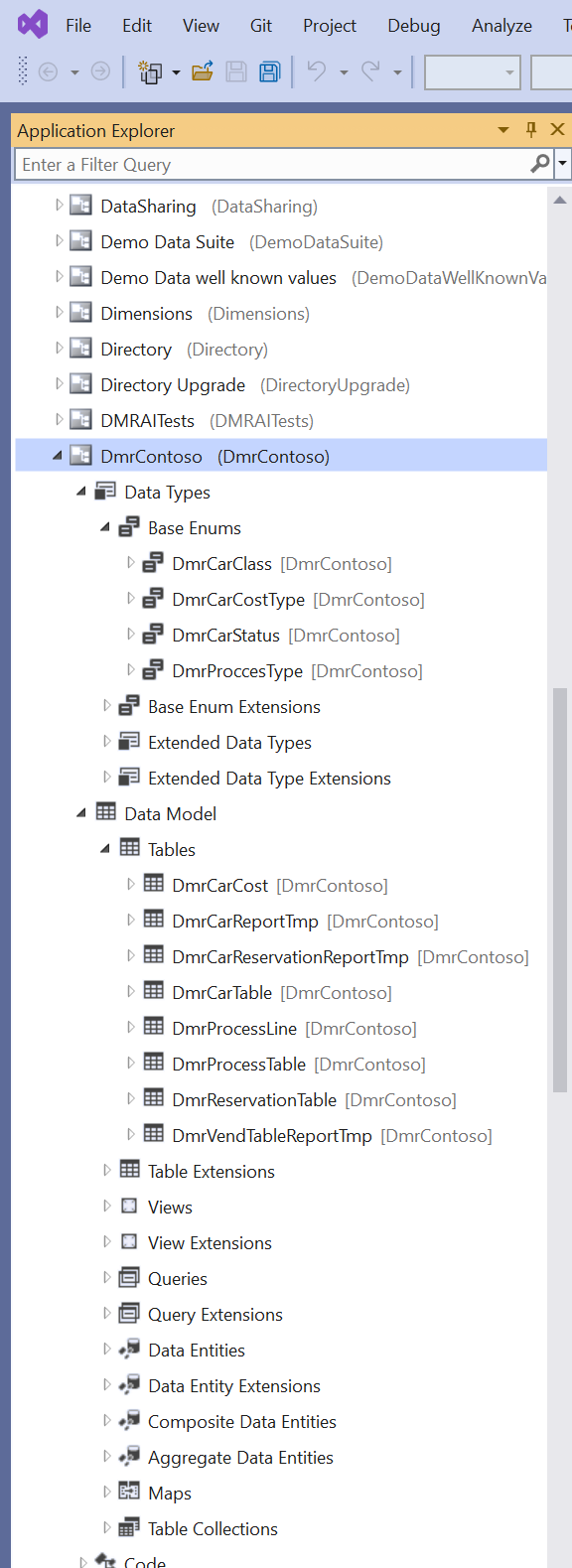
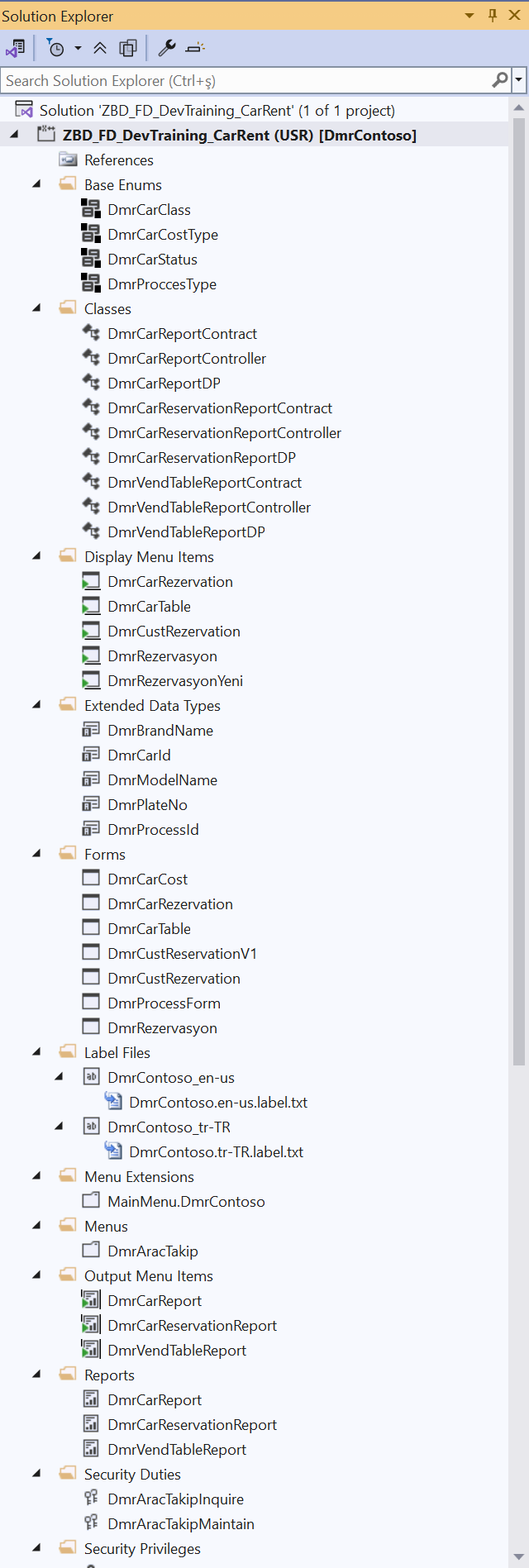
Figure 3 (left). Enum and table objects in the generated DmrContoso model.
Figure 4 (right). Classes, forms, labels, menus, and reports added to the D365 project.
Preserving the metadata structure and source behavior
We will also define file formatting as part of the generation rules. In this work, we generate object XML files as UTF-8 without BOM and with CRLF line endings, and label files as UTF-8 with BOM. Defining these details from the beginning will ensure a consistent layout in generated files and make version control differences easier to read.
However, checking the behavior that properties create in the target is just as important as generating correct XML. A property not explicitly written in the source may be interpreted with a different default value in the target. In that case, application behavior may change even if the file is structurally correct.
The AllowDuplicates property on indexes is an example. In this work, we explicitly write the relevant value to ensure that indexes permitting duplicate values in the source retain the same behavior in the target:
<AxTableIndex>
<Name>ModelYearIdx</Name>
<AllowDuplicates>Yes</AllowDuplicates>
<Fields>
<AxTableIndexField>
<DataField>ModelYear</DataField>
</AxTableIndexField>
<AxTableIndexField>
<DataField>ColorId</DataField>
</AxTableIndexField>
</Fields>
</AxTableIndex>
The behavior we want to preserve here is the ability to have multiple records with the same model year and color values. Accidentally making the index unique during transformation could cause problems during data entry or synchronization. We will therefore go beyond copying properties written in the source and also evaluate the effects of default values.
Creating forms with the appropriate pattern
When migrating forms, we will first examine how the source form is used. Does it show a single list, contain master data and detail information, or have a transaction structure consisting of a header and lines? We will select the form pattern based on this structure.
For the car rental module, we considered ten properties, such as data sources, header–line relationships, field count, and table group. After a five-step evaluation, we selected the appropriate pattern and recorded the rationale in a Form Decision Card. This evaluation workflow belongs to the project’s rule set; the table below summarizes the results.
The evaluation produced the following distribution:
Table 7. Distribution of patterns selected for the seven forms
| AX 2009 form structure | Pattern used in the target environment | Number of forms |
| Single grid and a small number of fields | Simple List 1.1 | 3 |
| Master data and detail groups | Details Master 1.4 | 1 |
| Header and lines | Details Transaction 1.4 | 3 |
The 3 + 1 + 3 distribution in Table 7 covers all 7 forms in the inventory. The pattern versions belong to the 10.0.2527.116 development environment used in this work; we should check the requirements again for a different target.
When applying the pattern, we will preserve the source form’s functionality and the meaningful order of its fields. We will make adjustments such as moving buttons to the Action Pane and removing fixed dimensions and color settings specific to the old client. We will also preserve groups and captions as far as possible; however, we may need to reorganize the control hierarchy where the target pattern requires it. We will add these changes to the form decision so that we can trace the differences between source and target.
Converting MorphX reports to the SSRS structure
Reports require a more extensive transformation. Since we cannot use AX 2009 MorphX reports with the same object structure in the target, we will recreate the data preparation code and report design in the SSRS structure.
In this work, we use a structure consisting of seven components for each report:
- A TempDB temporary table to hold the report data
- A query for data selection and filters
- A contract class for report parameters
- An RDP class to prepare the data
- A controller class to manage report execution
- A report design defining the fields and layout
- An output menu item to open the report from the application
This structure is the transformation approach used here. We will distribute the source report’s data preparation and output generation logic among these components.
Table 8. Mapping MorphX and SSRS components
| Structure on the MorphX side | SSRS equivalent used in this work |
| Query within the report | A separate AxQuery; filters exposed to the user are configured in the report dialog. |
| fetch() and send() flow | Data preparation and inserting records into the temporary table within processReport() in the RDP class |
| Automatically laid out sections (AUTOBODIES) | Auto design preserving the column order |
| SumAll on a field | Grand total in the relevant scope |
| Display methods and text created in code | Values calculated and written to temporary table fields |
| Colors defined in code | Color expressions in the report design |
For example, we will examine the points where send() produces output in the source report to determine which record should be written to the temporary table in the target. We will also calculate values from display methods within the RDP and transfer them into the fields used by the report. This will allow us to map the calculations and output rows in the source report to target components.
We chose Auto design for automatically laid out report sections. This allowed us to recreate the layout while preserving column order and reduce the need to prepare RDL manually. This choice is not mandatory for all reports; it should be evaluated separately based on the source layout and the expected output format.
Even so, generating the same data does not mean we have achieved the same visual output. Positions measured in millimeters and shapes in the source are not migrated one-to-one with this approach. We will also compare captions, column widths, totals, and pagination in the report output. We will add any differences we identify to the test list for evaluation.
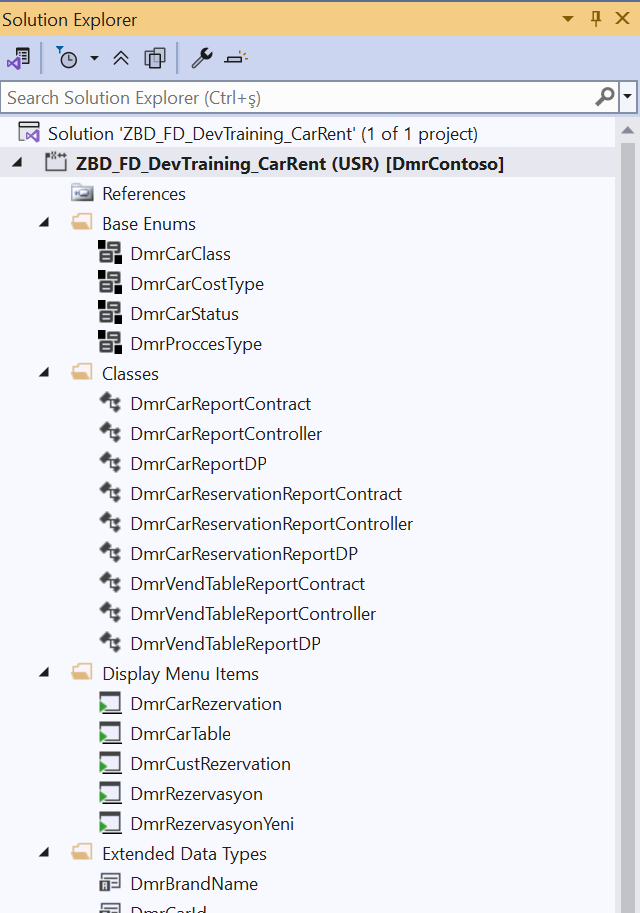
Figure 5. Contract, controller, and RDP classes generated for MorphX reports.
At the end of this stage, the target model’s objects will have been created. In the next step, we will check the generated metadata and X++ code by compiling them, then continue validation by running the forms and reports in the development environment.
Compiling and validating generated objects
We will generate objects in small groups and run a compilation check after each group. This check helps us identify code and metadata errors early; we will use application tests to verify that the objects function together correctly.
For these checks, we will use the xppc compiler in the UDE environment. The script we prepared will take the package directly from the target folder and compile it against the Microsoft packages in the active UDE configuration. We will be able to identify code and metadata errors earlier without starting a build in Visual Studio for every small change.
Compilation checks from the command line
The compilation script reads the active environment’s FrameworkDirectory path from the following registry location:
HKCU\Software\Microsoft\Dynamics\AX7\Development\Configurations
It then uses this path to construct the xppc invocation. The following representation has been split across lines for readability; the script passes these parameters in a single compiler invocation:
xppc -metadata=<target> -compilermetadata=<target> -modelmodule=DmrContoso
-referenceFolder=<FrameworkDirectory> -refPath=<FrameworkDirectory>\bin
-output=%TEMP%\xppc-ude-scratch\DmrContoso
The <target> and <FrameworkDirectory> values here are replaced by the script with actual folder paths. The command compiles the package generated in the target, using the standard packages of the relevant environment as references.
During development, we can use incremental compilation to check small changes. However, when we complete a generation group, we will run a full compilation. We will also run the label check at the same stage.
We invoke the script prepared for this work with the following command:
powershell.exe -NoProfile -ExecutionPolicy Bypass `
-File “.claude/skills/d365-xpp-compile-ude/scripts/Invoke-XppUdeBuild.ps1″ `
-Full -CheckLabels
Invoke-XppUdeBuild.ps1 and the parameters here belong to the project script we use. -Full runs a full compilation, while -CheckLabels runs the separate label validation we prepared.
Checking label references
Compiling the code alone does not show that all text displayed to the user has been prepared correctly. We will therefore check label references separately.
The -CheckLabels option checks whether label IDs with the @DmrContoso: prefix used in code and metadata exist in both the en-us and tr-TR files. This allows us to catch cases where an object contains a label reference but the text is missing from the relevant language file. This check validates the label’s existence; we need to examine translation accuracy and the suitability of the text for the user separately.
At the end of the compilation and validation operations for the car rental module, we obtained the following result:
RESULT: SUCCEEDED – 0 errors, 1 warnings in package elements, …
No compilation errors remained in the package. We retained the single warning as a recorded item because it was related to an issue originating in the source code that we migrated without changing its behavior. We will evaluate its correction as a separate decision. What matters here is being able to explain why warnings remain and how they will be handled, rather than overlooking them.
Verifying that XML files are read correctly
Alongside compilation, we will also check the metadata files. Valid XML does not necessarily mean that every property it contains is read by the target tools as we expect.
Property order matters in the metadata serialization structure used in this work. A property written in the wrong order can be skipped during reading without an error. In that case, a value we see in the file may have no effect when the object is opened in the development tools.
To check this, we read the generated XML into the relevant type in Microsoft’s metadata library and write it back as XML. We then compare the original file with the regenerated file. We can call this a round-trip check.
A simplified version of the approach we use for a table is as follows:
Add-Type -AssemblyName System.Runtime.Serialization
$bin = “$env:LOCALAPPDATA\Microsoft\Dynamics365\10.0.2527.116″
$bin = Join-Path $bin “PackagesLocalDirectory\bin”
$asm = [Reflection.Assembly]::LoadFrom(
“$bin\Microsoft.Dynamics.AX.Metadata.dll”
)
$type = $asm.GetType(
“Microsoft.Dynamics.AX.Metadata.MetaModel.AxTable”
)
$ser = New-Object Runtime.Serialization.DataContractSerializer($type)
$obj = $ser.ReadObject(
[Xml.XmlReader]::Create(“DmrCarTable.xml”)
)
$w = [Xml.XmlWriter]::Create(“DmrCarTable.roundtrip.xml”)
$ser.WriteObject($w, $obj)
$w.Close()
The library path in the example belongs to the development package used in this work; we should use the path and installed libraries in our own environment. This code demonstrates the basic read–write operation. The actual script should also close readers and writers, handle errors, and perform the comparison step.
This check, which we apply to tables, requires additional preparation for objects such as forms that contain different control types together. For these objects, the serializer needs a known types list containing the relevant types, and loading dependent DLLs may need to be managed through an AssemblyResolve handler.
We will not treat every difference in the comparison as an error. The serializer may not rewrite certain default values. For example, if CreateRecIdIndex = Yes is absent from the output file, we will check the relevant type’s default and the value in the object that was read. What we are looking for is a property we supplied being lost or interpreted differently from what we expected.
During this check, we found that the Columns property in a form group needed to appear before Caption. We applied the correction not only to the relevant form but also to the rule used in subsequent generation.
Checking consistency between objects
After compilation and XML checks, we will examine whether the generated model matches the plan. The consistency script we use checks whether references to tables, EDTs, enums, classes, menu items, and labels can be resolved. It also checks that object names match the name map and that old prefixes do not remain where transformation is required.
In the validation run, this script verified 172 element references and 113 label references. These are usages checked, not counts of unique objects or labels; the same definition may be referenced in multiple places. They should therefore not be compared directly with the earlier counts of 67 target elements and 68 labels.
The validation process also identified two views and a query that had been left out at an earlier generation stage, and these were completed. The finding here belongs to an intermediate check, while the zero-error result belongs to the compilation after the corrections. This allows us to evaluate compilation success and scope completeness separately.
Running in the development environment
The checks we run from the command line provide fast feedback during generation. However, they do not replace the build, database synchronization, and deployment operations in the development environment.
Once these checks are complete, we will bring the package into the UDE development environment and perform the required build and database synchronization. We will also complete deployment for reports. We will then open the application and check menus, forms, and reports.
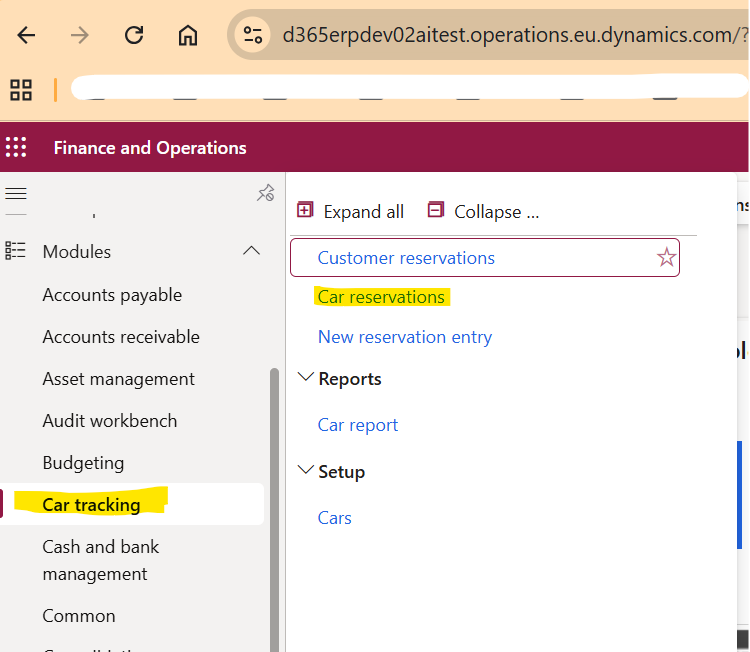
Figure 6. The Car tracking menu visible in the web client after deployment.
Once the menu is visible in the application, we can examine whether its menu items lead to the correct forms and reports. In forms, we will look at how data sources, fields, and header–line relationships work in the target client.
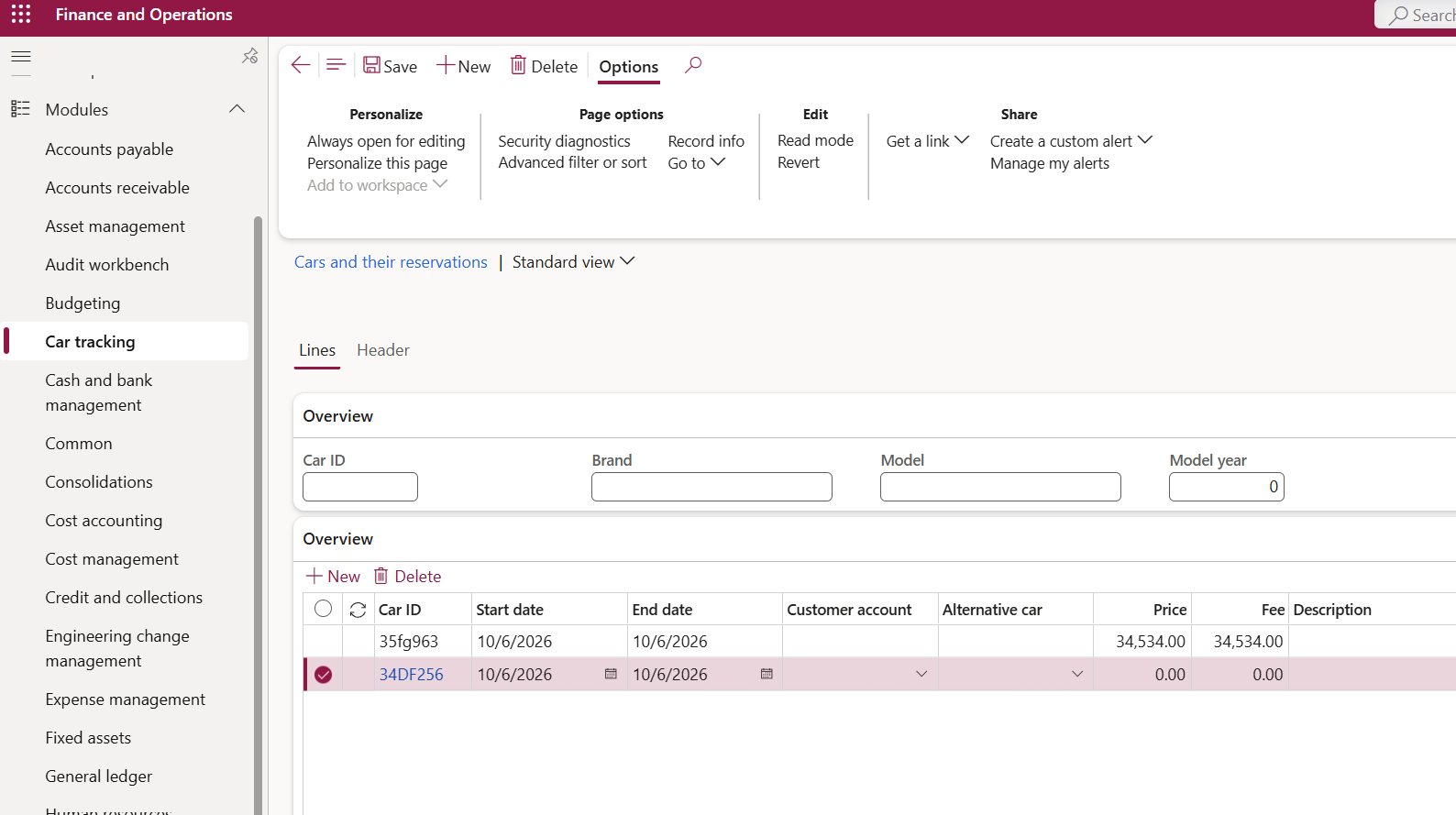
Figure 7. The header and line structure of the car and reservation form opened in Dynamics 365.
What we see in the car form with data entered
After opening the form, I entered test records on the Cars screen to examine how the fields appeared in the target client. Figure 8 contains three records with IDs C0001, C0002, and C0003. The model year, model, brand, vehicle class, license plate, color, and vehicle status columns are visible in the same grid. These are test records entered in the target; they do not indicate that data has been migrated from the AX 2009 database.
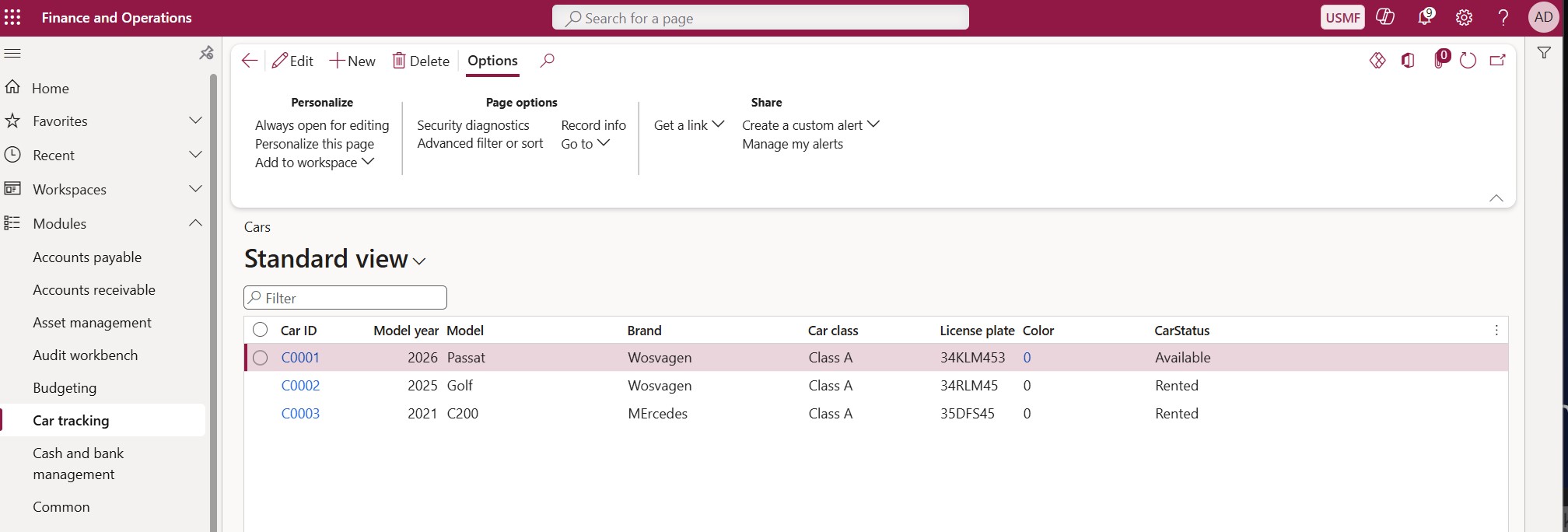
Figure 8. Three test records entered in the Dynamics 365 Cars form.
After verifying that records are listed, we should test creating, editing, and deleting records, mandatory fields, relationships, enum values, and filter behavior. For example, entering the same vehicle ID again, deleting a vehicle with a related reservation, or selecting an invalid class value are separate test scenarios. The screenshot does not mean that all of these scenarios have passed; we need to extend functional validation of the transformation with these scenarios.
Running the SSRS report and checking the output
After creating and compiling the report components, we will check the report by running it from the application. This will allow us to see how the structure we have created works together, from data preparation code through report design.
When we deploy the report in the car rental module and open it through Dynamics 365, we see that the vehicles entered in the form are listed in the output. The image below shows the first page of the report.
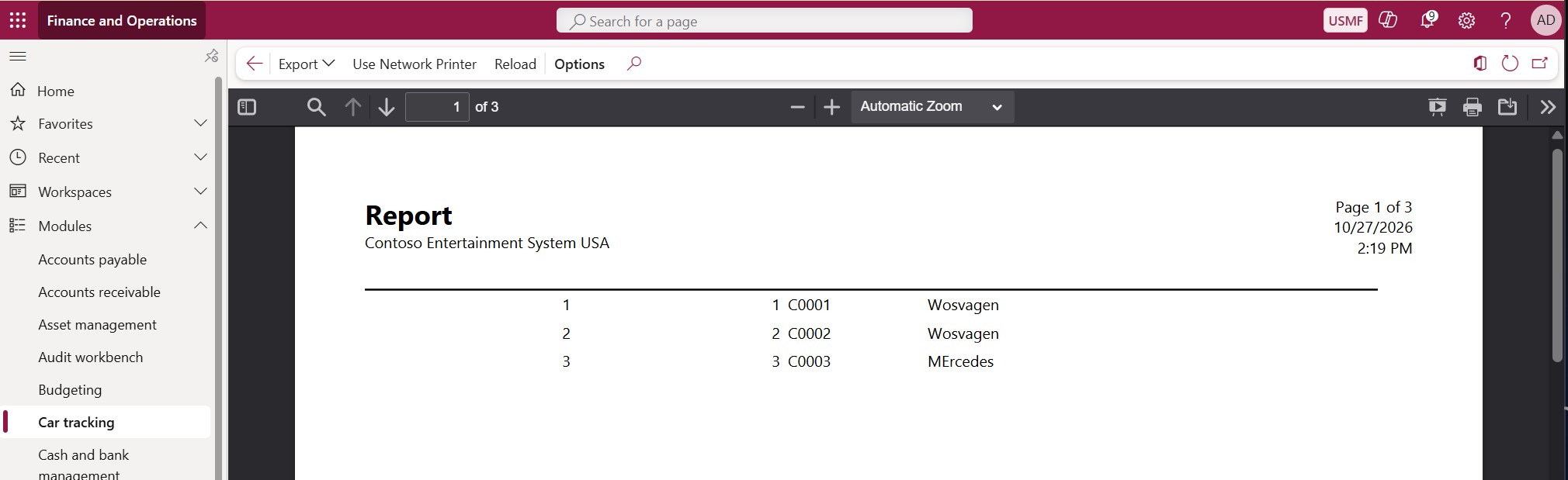
Figure 9. The first page and vehicle records of the SSRS report run from Dynamics 365.
The output contains vehicle IDs C0001, C0002, and C0003 together with brand information. We can perform our initial check by comparing these records with the data in the car form. The records we see in the form appearing in the report shows that the data preparation and output generation flow works. We then need to examine the report’s content and layout in greater detail.
Comparing source and target objects
While checking forms and reports in the application, we also need to trace the relationship between generated objects and their sources. Since XPO and XML have different structures, comparing files directly line by line will not provide enough information. First, we will use the name map to match each source object to its target equivalent.
We will then look at the object’s contents. For tables, we will compare fields, data types, methods, indexes, and relationships; for other objects, we will compare the properties appropriate to their structure. For example, having a field in the target table is not enough on its own. Its length, mandatory status, EDT, and relationships must also be created as planned. For indexes, we will check that field order and whether duplicate values are permitted have been preserved.
For forms, we will evaluate the source control structure together with the target pattern. Moving a button to the Action Pane may be an adjustment made to fit the target design. However, a missing method or menu item called by that button is a transformation issue that needs to be resolved. Even if the layout of fields and groups changes, we will expect the user’s operation and its result to be preserved.
For reports, we should also be able to trace how the source code is represented in the target. We will check which operations the source fetch() and send() flow becomes in the RDP class, which temporary table fields receive calculated values, and where those fields are used in the design. This will allow us to locate the relevant step, from data selection to calculation and design, when we see something missing in the output.
We will evaluate the differences found during comparison together with the transformation plan. If an adaptation was agreed in advance, its rationale will be in the plan. If we find a difference we cannot explain, we will add it to the issue list and investigate it.
When making a correction, we will not leave the change only in the generated XML file. If the issue comes from a general transformation rule, we will update that rule. If it is specific to the object, we will record the decision and the action to take. This will prevent the correction from being lost when we process the same source again.
Finally, we will compare newly generated files with their previous versions in version control. This review will allow us to see that the expected corrections have been applied and that no unintended changes have appeared in other objects.
Errors encountered during transformation
While migrating the car rental module, we encountered a total of 19 compilation errors in the xppc checks. These errors fell into five groups. Some were caused by missing package references, while others resulted from properties expected by form patterns and query structures in the target environment.
The error table brings together the causes identified and the solutions applied in this work. The rule set was updated based on these findings.
Table 9. Causes and solutions for compilation errors
| Error code | Cause encountered in this work | Solution applied |
| EdtDoesNotExist, UnderlyingFieldTypeNotFound | The standard Price EDT used was in the ApplicationCommon package, but the target model did not reference this package. | We added the ApplicationCommon package to the model’s ModuleReferences list. |
| TableDisplayEditReturnTypeUnknown | Of the display methods checked through the CustTable data source on the form, mcrIsMerged depended on a type in the Retail package. | We added the Retail reference. Narrowing the field list in the data source did not resolve this error. |
| PatternPropertyRequiredValue | Some properties expected by the Details Transaction pattern in use were missing. | We defined VisibleRows = 5 and VisibleRowsMode = Fixed on the line grid, and Style = Tabs on the line details tab. |
| PatternControlNotAllowed | The Fields and Field Groups subpattern we used did not accept the nested group structure from the source form. | We removed the extra outer group and moved the inner groups directly under the relevant FastTab. |
| FieldListEmpty | The field list in generated report queries was empty, and dynamic field selection was not enabled. | We defined <DynamicFields>Yes</DynamicFields> on the relevant data sources to reproduce the source behavior of selecting all fields. |
These error codes should not be treated as general rules with a single solution. For example, EdtDoesNotExist may occur in another object because an EDT was not generated or was named incorrectly. What we did here was start with the error message and examine the relevant object and its dependencies to identify the cause.
Completing missing package references
Package references are one of the areas that can easily be overlooked when migrating customizations. It is not enough for a standard object used in the source code to exist in the target environment. The target model must also reference the package containing that object.
The error encountered through CustTable was particularly noteworthy in this respect. Even after narrowing the field list on the form, the compiler continued checking the dependency related to display methods. We resolved the issue by adding a reference to the Retail package, which contained the relevant return type.
We can also carry out this investigation with Claude Code. We can ask it to locate the object from the error message in the target metadata, identify its package, check existing references, and prepare the necessary change. We can then rerun compilation to check the result of the change.
Package references are defined in the ModuleReferences section of the model’s Descriptor/<Model>.xml file. The reference list in this work is as follows:
<ModuleReferences xmlns:d2p1=”http://schemas.microsoft.com/2003/10/Serialization/Arrays”>
<d2p1:string>ApplicationCommon</d2p1:string>
<d2p1:string>ApplicationFoundation</d2p1:string>
<d2p1:string>ApplicationPlatform</d2p1:string>
<d2p1:string>ApplicationSuite</d2p1:string>
<d2p1:string>Retail</d2p1:string>
</ModuleReferences>
Rather than copying this list directly to another model, we should identify the packages that model actually needs. Each added reference expands the model’s dependency scope and creates a relationship that needs to be considered in subsequent updates.
For this reason, we first added the required reference to a working copy of the package and compiled it. After confirming that the error was resolved, we applied the change to the main output and recorded why it was added in the decision log.
Validating the checking tools as well
Not every issue encountered during transformation came from the generated code. At one point, label validation reported some labels as missing even though they existed in the files. The cause was the case-insensitive -match comparison in the script matching the letter “I” differently under the Turkish locale. We resolved the issue by changing the comparison to the case-sensitive -cmatch. This example shows that we need to test the validation tools as well: when a check reports an error, we should examine the check itself as well as the generated object. We applied the correction to the shared script so that it would also be used in subsequent label checks.
How we can proceed in a real project
The car rental module allowed us to examine different object types together. However, it was a module with limited scope, consisting entirely of custom objects. In a real project, we may encounter modifications to standard objects, integrations, batch jobs, document operations, and more complex dependencies.
For this reason, when starting similar work, it is useful to first select a module whose dependencies we can understand. We can use this module to test both the transformation rules and the validation tools. We can see which operations can be reused, where expert decisions are needed, and which objects require more effort.
First, we will freeze the source version we will work on. We will then inventory the objects and evaluate whether existing customizations are covered by standard functionality in the target. After preparing the name map and transformation plan, we will carry out generation, compilation, synchronization, and application checks.
At the end of this initial work, we should examine not only the working model but also the time spent and the points requiring manual intervention. Completing missing rules and scripting repetitive operations before moving on to the next module will help us carry out subsequent work more systematically.
Evaluating modifications to standard objects
Additional analysis is required if standard objects have been customized. First, we should compare the modified object with its unmodified standard version from the same AX version. This will allow us to identify which fields, methods, or business rules were added later.
We will then evaluate how the modification should be handled in the target version. The requirement may now be covered by standard functionality, or the target may use a different data model. If the customization is still needed, we will examine suitable extension points and decide whether to use Chain of Command, an event handler, or another extension option.
Because the car rental module contained no modified standard objects, this work did not validate that part. We need to perform source difference analysis, target design, and functional tests on other examples for this.
Preparing for go-live will also involve work beyond code migration. Role and permission checks, integration testing, data migration, performance evaluation, and user acceptance should be carried out separately. The model we generate will form one part of these activities.
Can we also use it for AX 2012
We can also use the approach of analyzing sources, defining transformation rules, recording decisions, and validating generated results in projects migrating from AX 2012 to Dynamics 365. However, rather than applying the rules prepared for AX 2009 unchanged, we need to reevaluate them according to the structure of the source version.
For an AX 2012 migration, we should also assess existing upgrade tools at the outset and determine how much of the project scope they cover. We can use AI support to examine source code differences, plan remaining adaptations, evaluate extension options, and perform post-transformation checks.
Conclusion
In this article, I explained how we can migrate X++ code from AX 2009 to Dynamics 365 faster with AI support, using a sample car rental project. We progressed from XPO analysis to creating target objects, from compilation checks to forms with data entered and SSRS output. The 157 rules and 28 recorded decisions produced by the work provided a body of knowledge we can also use in subsequent projects.
Of course, a version upgrade project is not completed by migrating code alone. We also need to evaluate the standard functionality introduced in the new version, business needs that have changed over the years, and customizations that are no longer necessary. Data migration, integrations, security, testing, and preparing users for the new system are also important parts of this process.
Nevertheless, I believe that using AI in this way for code analysis and transformation can deliver substantial time savings. In particular, establishing rules for repetitive work and validating each stage can give the technical team more time for functional decisions and more complex adaptations.
In this example, we worked with a limited module consisting of custom objects. The next step will be to apply the same approach to more complex dependencies and modifications to standard objects. By improving the rules with each new effort, I aim to build a more comprehensive infrastructure that we can reuse in the code upgrade process.
You can download the sample files, transformation rules, and scripts used in this work here. I recommend reviewing and adapting them to your source and target versions before using them in your own project.
Best regards.
Fatih Demirci





No comments yet.